As the mtu on an ip network could exceed 1500b it is not so strange to allow larger than 1500b frames on the tunnel. But this could be adjusted to follow the max mtu values on ethernet interfaces. As taken from my head max mtu on ethernet is about 9000b
Feed All Stories
Mar 20 2020
Mar 20 2020
jestabro moved T1228: pppoe default-route force option not working (Rel 1.2.0-rc11) from Backlog to Finished on the VyOS 1.2 Crux (VyOS 1.2.5) board.
runar added a comment to T2007: SSTP accepts client MTU up to 16384 bytes.
jestabro changed the status of T2142: vyos-build: Add required packages and step to build-GCE-image script from Open to In progress.
jestabro added a comment to T2142: vyos-build: Add required packages and step to build-GCE-image script.
c-po changed the status of T2008: Adjustment of SSTP CLI to be more consistent to the rest of VyOS from Open to In progress.
c-po changed the status of T2007: SSTP accepts client MTU up to 16384 bytes from Open to In progress.
GitHub <noreply@github.com> committed rVYOSONEXf5a5befd7625: Merge pull request #252 from thomas-mangin/T2057-state (authored by c-po).
jack9603301 added a comment to T815: Add DHCPv6 server prefix-delegation support.
I'm looking forward to this feature, especially that I want to dynamically update the NPT policy through the DHCPv6 PD feature, rather than manually reset the nptv6 address translation policy every time I dial
jack9603301 added a comment to T365: OVS as replacement of Linux bridge.
It's a good idea to use OVS as Linux bridge, which means that vyos can use OVS to provide better management and more support features in bridge management, or even use vyos as an excellent switch to run and manage its complex functions, or provide a docking interface with SDN to transform the network!
jestabro added a comment to T2142: vyos-build: Add required packages and step to build-GCE-image script.
Yes, @jjakob, I run docker as indicated in the vyos-build README, which includes --privileged. I am not that concerned with the docker issue here; rather I want the script to work, and am adding in the necessary ingredients to the script itself. Compare the older prescription:
https://wiki.vyos.net/wiki/Building_images_using_vyos-build_Docker_container#Building_Google_Cloud.2FGCE_image
GitHub <noreply@github.com> committed rVYOSONEXaca6154bfd25: Merge pull request #250 from thomas-mangin/T2057-convert (authored by c-po).
elbandi added a comment to T2054: Changing "system name-server" doesn't update dns forwarding config, neither does "restart dns forwarding".
just note. our fw is using own dns forwarder for resolv, because the internal ip reverse addresses are redirected to local dns server.
so plase handle this situation too.
jack9603301 added a comment to T421: Add Pv6 prefix delegation support.
We hope to provide better support for DHCPv6 PD in the future version of vyos
jjakob added a comment to T2142: vyos-build: Add required packages and step to build-GCE-image script.
The discussion says the container should be started with --privileged, as is documented in the vyos-build readme. Did you test it with --privileged?
jjakob changed the status of T2144: vyos-build: docker: selection of text in the terminal still selects it in vim (mouse isn't completely disabled) from Open to In progress.
Duplicate of T421
jjakob added a comment to T2054: Changing "system name-server" doesn't update dns forwarding config, neither does "restart dns forwarding".
Still present in 1.3-20200319
jjakob added a comment to T2072: Shell autocomplete of option (config node) with quoted value doesn't work.
The above commit fixes value help on tab (it displays correct quoted values, the script doesn't error any more) but the completion itself is still broken.
jjakob changed the status of T2072: Shell autocomplete of option (config node) with quoted value doesn't work from In progress to On hold.
GitHub <noreply@github.com> committed rVYOSONEX86e504525f96: Merge pull request #249 from jjakob/fix-checkcertheader-func (authored by c-po).
jack9603301 created T2143: Hope to support DHCPv6 PD .
Unknown Object (User) added a comment to T2118: Failure to boot after power outage due to dirty filesystem and no fsck in initramfs.
alien added a comment to T2125: show interfaces wireguard wg0 - doesn't work .
@hagbard
Another bug:
Mar 19 2020
Mar 19 2020
jjakob changed the status of T2140: openvpn: tls file check function checkCertHeader returns True even when no match is found from Open to In progress.
c-po moved T2135: Login banner missing spacing now from Need Triage to Finished on the VyOS 1.3 Equuleus board.
jestabro moved T2132: Document kernel boot parameter 'vyos-config-debug' from Need Triage to Finished on the VyOS 1.3 Equuleus board.
jestabro closed T2132: Document kernel boot parameter 'vyos-config-debug', a subtask of T1622: Add failsafe and back trace to boot config loader, as Resolved.
jestabro changed the status of T1301: bgp peer-groups don't work when "no-ipv4-unicast" is enabled. from Unknown Status to Resolved.
jestabro moved T1301: bgp peer-groups don't work when "no-ipv4-unicast" is enabled. from Backlog to Finished on the VyOS 1.2 Crux (VyOS 1.2.5) board.
jestabro edited projects for T1853: wireguard - disable peer doesn't work , added: VyOS 1.2 Crux (VyOS 1.2.6); removed VyOS 1.2 Crux (VyOS 1.2.5).
jestabro edited projects for T1949: Multihop IPv6 BFD is unconfigurable, added: VyOS 1.2 Crux (VyOS 1.2.6); removed VyOS 1.2 Crux (VyOS 1.2.5).
hagbard added a comment to T2125: show interfaces wireguard wg0 - doesn't work .
@alien Can you please test the issue with the latest rolling release?
jestabro reopened T2096: Provide "generate" and "show" commands via the http API as "In progress".
This should be made consistent with other usage: paths should be lists, not strings. I will make the change, and any other details needed for consistency with model.
jjakob changed the status of T2139: openvpn: allow "dh-file none" to disable DH for ECDH keys from Open to In progress.
jjakob added a comment to T1538: Update conntrack-sync packages to fix VRRP issues.
I opened the PR for our custom build of the package in vyos-build as well: https://github.com/vyos/vyos-build/pulls. I was waiting on testing results from anyone, but I went and tested it myself. The basic functionality works, I couldn't test the above bug. If it's merged and the new package build is added to CI, the above debian PR isn't needed (or our custom build isn't).
jjakob added a comment to T577: Unconfigured Ethernet interface discovery partial failure on boot.
I ran into this today after upgrading to latest 1.3 rolling image. All interfaces were added and appeared to have the correct macs (the output of ip link matched what was in the config), but the physical interfaces to which they corresponded weren't right. I found this by looking at the link state of each interface and saw that two if them were swapped. The interface that should be eth2 was physically eth4 and vice versa, but the macs it was showing in ip link was wrong for that physical card, as if it were set to the other interface's mac erroneously.
I got the cards to detect properly after 2 reboots.
jestabro edited projects for T2096: Provide "generate" and "show" commands via the http API, added: VyOS 1.2 Crux (VyOS 1.2.6); removed VyOS 1.2 Crux (VyOS 1.2.5).
jjakob changed the status of T2137: vyos-build: set debian mirror for building docker image from ./configure from Open to In progress.
njh added a comment to T2087: Add maxfail 0 option to pppoe configuration..
I installed 1.3-rolling-202003190217 today and verified that it contains the following lines now:
GitHub <noreply@github.com> committed rVYOSONEXa0cd6bbf2985: Merge pull request #247 from DmitriyEshenko/mpls-impl (authored by c-po).
vindenesen added a comment to T1293: Zone-policy implementation does not allow secondary IP on an interface to communicate.
I seem to experience the same in a VRRP setup using VyOS 1.3-rolling-202003110613. I will try to gather more information along with a sample config file.
Unknown Object (User) published a new version of Submitting a patch.
Unknown Object (User) edited the content of Development.
Mar 18 2020
Mar 18 2020
Unknown Object (User) added a comment to T915: MPLS Support.
Some tests results
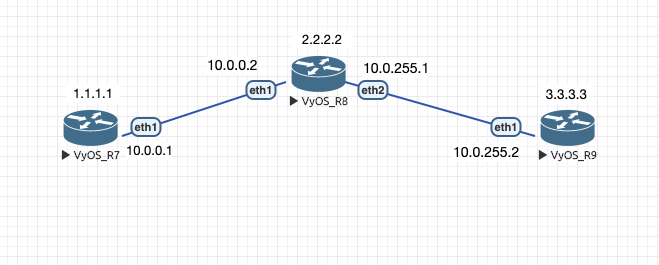
vyos@R8:~$ show configuration commands | match mpls
set protocols mpls ldp discovery transport-ipv4-address '2.2.2.2'
set protocols mpls ldp interface 'eth1'
set protocols mpls ldp interface 'eth2'
set protocols mpls ldp router-id '2.2.2.2'
vyos@R8:~$ show mpls ldp neighbor
AF   ID              State       Remote Address    Uptime
ipv4 10.0.0.1        OPERATIONAL 10.0.0.1        00:00:22
ipv4 3.3.3.3         OPERATIONAL 10.0.255.2      00:00:33
vyos@R8:~$ show mpls ldp interface
AF   Interface   State  Uptime   Hello Timers  ac
ipv4 eth1        ACTIVE 00:00:51 5/15           1
ipv4 eth2        ACTIVE 00:00:52 5/15           1
Unknown Object (User) added a comment to T915: MPLS Support.
2 PR for basic MPLS implementation
https://github.com/vyos/vyos-build/pull/90
https://github.com/vyos/vyos-1x/pull/247
c-po moved T1870: Extend Pipeline scripts to support PullRequests from Need Triage to In Progress on the VyOS 1.3 Equuleus board.
c-po changed the status of T1870: Extend Pipeline scripts to support PullRequests from Open to In progress.
dmbaturin added a comment to T2130: XML schema: add valueHelp support in op-mode definitions..
Could you describe your "dream syntax" for it?
The op mode node.def's simply don't have a concept of value help in vyatta-cfg, only comp_help (<completionHelp> in XML terms).
dmbaturin updated subscribers of T2136: XML command definition convertor doesn't disallow tag nodes with multi flag on.
dmbaturin changed the status of T2136: XML command definition convertor doesn't disallow tag nodes with multi flag on from Open to Needs testing.
Mar 17 2020
Mar 17 2020
kroy updated the task description for T2135: Login banner missing spacing now.
kroy updated the task description for T2135: Login banner missing spacing now.
elbandi added a comment to T1538: Update conntrack-sync packages to fix VRRP issues.
https://salsa.debian.org/pkg-netfilter-team/pkg-conntrack-tools/-/merge_requests/1
if he merge the PR, we can use it!
GitHub <noreply@github.com> committed rVYOSONEXb6e368f26544: Merge pull request #246 from thomas-mangin/T1849-delay (authored by c-po).
GitHub <noreply@github.com> committed rVYOSONEX8f56d13e11eb: vxlan: T2134: fix NameError: name 'config' is not defined (authored by Michael Petö <michael@petoe.me>).
elbandi updated the task description for T2133: ipv6 disable not working.
syncer edited projects for T1982: Increase rotation for atop.acct, added: VyOS 1.3 Equuleus; removed VyOS 1.2 Crux.
c-po added a comment to T2128: Add description field for protocols static route .
There is yet no intention to add such command. Usually all description strings are rendered into the appropriate configuration file or are added to the interface as alias used by SNMP monitoring. What you wish to do is actually commenting on your configuration. Please refer to the user-guide about the comment command.
alien added a comment to T2128: Add description field for protocols static route .
A description field is required to understand what this is for.
jestabro added a comment to T2132: Document kernel boot parameter 'vyos-config-debug'.
jestabro changed the status of T2132: Document kernel boot parameter 'vyos-config-debug' from Open to In progress.
Mar 16 2020
Mar 16 2020
c-po added a comment to T2128: Add description field for protocols static route .
What exactly do you mean with "description"?
c-po changed the status of T2131: Improve syslog remote host CLI definition from Open to In progress.
c-po updated the task description for T2129: XML schema: tagNode not allowed on first level in new XML op-mode definition.