@c-po this is just DHCP-client in this case, Windows, Linux or VPC (Virtual PC).
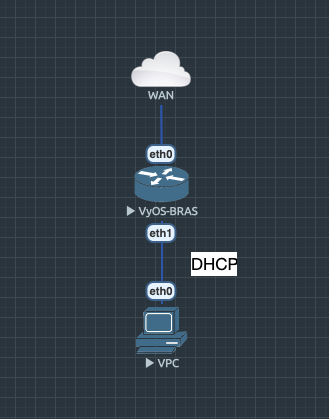
@c-po this is just DHCP-client in this case, Windows, Linux or VPC (Virtual PC).
My first thought would be something wrong with offloading on the NIC -
there was a change recently that turns all the offloading settings on by
default, you can disable some in the ethernet config. My suggestion to
leave the default disabled and enable it on demand wasn't taken into
account.
@trae32566 the reason I used the call is b/c it was the call used in VyOS 1.2 - no particular reason to not look into crypt()
@Dmitry how can I test the IPoE server? Is there a client for Windows or a "howto"?
Any reason in particular you're not using crypt.crypt() here?
Still facing the issue of two initrd images for building iso using latest latest crux branch. Using this kernel rebuilding steps https://wiki.vyos.net/wiki/Rebuild_VyOS_kernel_Step#VyOS_1.2.x
I'm seeing this in Vyos 1.2.5 just released:
I've just encountered this bug with Vyos 1.2.5 (final, official ISO)
Improve op-mode commands for ipoe-server
https://github.com/vyos/vyos-1x/pull/344
vyos@vyos:~$ show ipoe-server sessions
ifname | username |    calling-sid    |     ip     | rate-limit | type | comp | state  |  uptime
--------+----------+-------------------+------------+------------+------+------+--------+----------
 ipoe0  |          | 00:50:79:66:68:09 | 100.64.0.2 |            | ipoe |      | active | 00:00:11
 ipoe1  |          | 00:50:79:66:68:0a | 100.64.0.3 |            | ipoe |      | active | 00:00:09
These 2 PR are needed for new xml format
thanks for explaining the backgrounds! I wonder if a removal of the hostfile-update option should be suggested.
I can try on four nodes with a recent rolling release in the next few days. I just need to find some proper maintenance window.
@fetzerms Thank you for the logs; that was the output I was hoping to confirm. The WSGI server in python3-bottle is showing occasional instabilities; I am not able to confirm with collections of set commands similar to yours, though I am able to induce it artificially. There are a few recent changes that will help avoid triggering this, while I track down a root cause. If you have a chance, it would be helpful if you could try a recent rolling (>= vyos-1.3-rolling-202004100117). If your are able to monitor the output of 'journalctl -fx' on the system, while executing remote configuration, that would be very useful, though that may not be feasible in your setting.
@adestis The status 'Backport Candidate' indicates the intention to include it in 1.2.x; I may have mistakenly removed the specific project (1.2.6) when I changed the status.
That's how DNS forwarders usually work. If they can find a domain
locally, they'll use it, if not forward to upstream. The same behaviour
is everywhere, on all resolvers.
Found the culprit.
@jestabro you removed VyOS 1.2.6 does this mean it will not be included in 1.2.x ?
Found that in drivers 2.3.6 and newer this should also work:
Note: will be good to disable this by udev rule for i40e
Todo (migrate to systemd or migrate generated configs to /run, to not leave behind corpses after a system reboot)
It would be interesting to hear the reason the FRR chose this behavior as default for one of their profiles. It causes major reconvergence issues for BGP networks and I don't see an obvious benefit.
Shouldn't it be fixed at some point though? I mean is there a reason this should stay something that has to be worked around?
@dmbaturin to enable it by default we need rewrite BGP to new python/XML format and use template, where this feature will be by default because FRR by default doesn't check routes in the RIB.
As far as I remember, originally in our Quagga days, it was the case: nothing was advertised if it wasn't present in the RIB. So if you wanted to advertise e.g. 192.0.2.0/24 but had it split into /25's, you'd need both set protocols bgp ... network 192.0.2.0/24 and set protocols static route 192.0.2.0/24 blackhole.
Sorry for the noise, it was disabled. I forgot to save the config before upgrading, doh.
vyos@rt-home# show openvpn
 openvpn vtun0 {
     encryption {
         ncp-ciphers aes256gcm
     }
     hash sha512
     keep-alive {
         failure-count 60
         interval 59
     }
     mode server
     persistent-tunnel
     server {
         client jernej-note3 {
             ip x.x..7.10
         }
         client-ip-pool {
             start x.x.7.127
         }
         domain-name home
         max-connections 10
         push-route x.x.0.0/24
         subnet x.x.7.0/24
         topology subnet
     }
     tls {
         ca-cert-file /config/auth/openvpn/ca.crt
         cert-file /config/auth/openvpn/rt-home.crt
         crypt-file /config/auth/openvpn/tls.key
         key-file /config/auth/openvpn/rt-home.key
     }
 }
 openvpn vtun1 {
     description b
     device-type tun
     disable
     encryption {
         ncp-ciphers aes256gcm
     }
     hash sha512
     keep-alive {
         failure-count 60
         interval 59
     }
     local-port 1195
     mode server
     persistent-tunnel
     server {
         client jernej-note3 {
             ip x.x.8.10
         }
         client-ip-pool {
             start x.x.8.6
             stop x.x.0.3
         }
         domain-name home
         max-connections 10
         push-route x.x.0.0/24
         subnet x.x.8.0/24
         topology subnet
     }
     tls {
         ca-cert-file /config/auth/openvpn/ca.crt
         cert-file /config/auth/openvpn/rt-home.crt
         crypt-file /config/auth/openvpn/tls.key
         key-file /config/auth/openvpn/rt-home.key
     }
 }
[edit interfaces]
I tried removing client-ip-pool if it was a issue with it, no difference.
vyos@rt-home# delete openvpn vtun1 server client-ip-pool
[edit interfaces]
vyos@rt-home# commit
[ interfaces openvpn vtun1 ]
Warning: Client "jernej-note3" IP x.x.8.10 is in server IP pool, it is not reserved for this client.
Diffie-Hellman prime file is unspecified, assuming ECDH
Using the following configuration on 1.3-rolling-202004131043 I see two tunnels running:
Can you share me a configuration?
Fixed in VyOS 1.3-rolling-20200413104
This is a old quirk that's long known (probably was already reported) and
can be worked around by adding a pseudo-ethernet interface with the DHCP
client on it.
Upgraded the firmware of the X710 adapters from 6.0 to 6.8, waiting for Dell to get 7.0 and 7.2 ready. But for now the sessions are 18 hours stable so little optimistic that it was a firmware issue and not BGPd causing issues