nvm, its frr 10.3's feature, vyos currently use 10.2, closing task now
Feed All Stories
Jun 29 2025
Jun 29 2025
factor2431 added a comment to T7597: Add BFD strict mode for BGP.
factor2431 changed the status of T7596: Support independent configuration of echo receive-interval and echo transmit-interval in BFD from Open to In progress.
factor2431 updated the task description for T7589: Add no-split-gso and ack-filter for CAKE.
GitHub <noreply@github.com> committed rVYOSONEX862817a7207c: Merge pull request #4581 from talmakion/bugfix/T7544/escape-vrfif-nftables (authored by c-po).
Andrew Topp <andrewt@telekinetica.net> committed rVYOSONEXc741a290261e: vrf: T7544: Ensure correct quoting for VRF ifnames in nftables.
syncer edited projects for T7477: control source for syslog packets, added: VyOS Rolling; removed VyOS Ansible Collection.
Jun 28 2025
Jun 28 2025
c-po updated the task description for T7591: Remove copyright years from source files.
c-po added a comment to T7591: Remove copyright years from source files.
Vijayakumar renamed T7592: black/ruff quote issue and ruff support fix from black/ruff quote issue to black/ruff quote issue and ruff support fix.
Vijayakumar updated the task description for T7592: black/ruff quote issue and ruff support fix.
Vijayakumar updated the task description for T7592: black/ruff quote issue and ruff support fix.
Vijayakumar closed T7565: Enable PR mirroring for repo libpam-radius-auth, libnss-mapuser as Resolved.
Vijayakumar renamed T7565: Enable PR mirroring for repo libpam-radius-auth, libnss-mapuser from Enable PR mirroring for repo libpam-radius-auth to Enable PR mirroring for repo libpam-radius-auth, libnss-mapuser.
Vijayakumar closed T7517: vyos-1x make fie fix, a subtask of T6707: Implement a new build and release workflow based on GitHub Actions, as Resolved.
Vijayakumar closed T7566: Improve PR mirror onboarding, a subtask of T6707: Implement a new build and release workflow based on GitHub Actions, as Resolved.
Vijayakumar renamed T7566: Improve PR mirror onboarding from Improve P:R mirror onboarding to Improve PR mirror onboarding.
factor2431 updated the task description for T7589: Add no-split-gso and ack-filter for CAKE.
c-po updated the task description for T7590: cli: define a helper that generates a list of ALL available op-mode commands to embed in smoketesting.
c-po triaged T7590: cli: define a helper that generates a list of ALL available op-mode commands to embed in smoketesting as Normal priority.
factor2431 changed the status of T7589: Add no-split-gso and ack-filter for CAKE from Open to In progress.
factor2431 added a comment to T7589: Add no-split-gso and ack-filter for CAKE.
factor2431 updated the task description for T7589: Add no-split-gso and ack-filter for CAKE.
Jun 27 2025
Jun 27 2025
jestabro renamed T7588: Vyconf: Call libvyosconfig functions from main thread under http-api from Call libvyosconfig functions from main thread under http-api to Vyconf: Call libvyosconfig functions from main thread under http-api.
jestabro updated the task description for T7588: Vyconf: Call libvyosconfig functions from main thread under http-api.
Unknown Object (User) changed the status of T7545: Command 'show vpn debug peer <peer_name>' does not work correctly from Open to In progress.
Unknown Object (User) added a comment to T7545: Command 'show vpn debug peer <peer_name>' does not work correctly.
That's it, thanks! Well done :)
hedrok added a comment to T7545: Command 'show vpn debug peer <peer_name>' does not work correctly.
I've rebuilt debian package for vyos-1x using
Unknown Object (User) added a comment to T7545: Command 'show vpn debug peer <peer_name>' does not work correctly.
@hedrok Have you rebuilt the image and tested the PR?
hedrok added a comment to T7545: Command 'show vpn debug peer <peer_name>' does not work correctly.
Unknown Object (User) added a comment to T4816: IPv4-mapped and IPv4-compatible IPv6 addresses not valid anymore.
The case is very rare
Unknown Object (User) lowered the priority of T4816: IPv4-mapped and IPv4-compatible IPv6 addresses not valid anymore from High to Low.
Jun 26 2025
Jun 26 2025
talmakion added a comment to T7337: Documentation for as-path-list regular expressions.
@991jo As far as I can tell, the documentation for both VyOS and FRR are simply correct - both bgp as-path access-list and show bgp ipvX regex render AS paths as text and run a POSIX regular expression against them. There's no range expansion or other fanciness beyond special handling of the '_' match - just a space-separated text string of ASNs vs a regexec()'d pattern.
egoistdream added a comment to T7274: EVPN ESI requires arbitrary change to VxLAN interface to update fdb from EVPN.
I managed to recreate the lab in GNS3 with the exact same EVPN 1-to-1 configuration as I had on the physical setup, and it seems the same bug appears. As shown in the screenshot, one router keeps sending ARP requests while the other keeps receiving ARP replies in a loop.
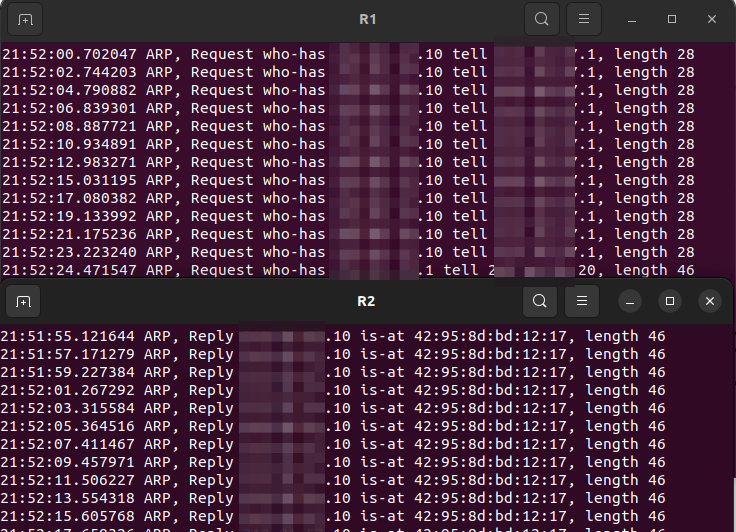
Viacheslav triaged T7582: IPSec VPN: Add support for `port` to associate with protocol for policies as Normal priority.
dmbaturin added a parent task for T7541: Make every operational command path unique: T7583: Implement a new operational command runner.
SrividyaA updated the task description for T7581: IPsec service fails after upgrading from 1.3.8 to 1.4.2 if protocol all is configured.
Viacheslav raised the priority of T7581: IPsec service fails after upgrading from 1.3.8 to 1.4.2 if protocol all is configured from Normal to High.
SrividyaA triaged T7581: IPsec service fails after upgrading from 1.3.8 to 1.4.2 if protocol all is configured as Normal priority.
GitHub <noreply@github.com> committed rVYOSONEX22c6a817faee: Merge pull request #4578 from dmbaturin/T7578-enforce-op-mode-path-uniqueness (authored by dmbaturin).
GitHub <noreply@github.com> committed rVYOSONEX062f7f4e7cd7: Merge pull request #4565 from dmbaturin/T7560-op-virtual-tag-nodes (authored by dmbaturin).
talmakion added a comment to T7544: Trying to create a VRF named "vni" leads to an unhandled exception.
$ sudo nft add element inet vrf_zones ct_somethingelse_map { "vni" : 100 }
Error: syntax error, unexpected vni
add element inet vrf_zones ct_somethingelse1_map { vni : 100 }
                                                   ^^^
GitHub <noreply@github.com> committed rVYOSONEX5c2f70ffd820: Merge pull request #4575 from abhisheksafui/t7567_load_balance_show_fix (authored by dmbaturin).
Jun 25 2025
Jun 25 2025
dmbaturin added a comment to T7578: Enforce operational mode command name uniqueness.
aalmenar added a comment to T7432: RPKI VRF Support.
yzguy added a comment to T7432: RPKI VRF Support.
@aalmenar I believe you would need to configure RPKI in the default VRF + your management VRF. They validate prefixes for their respective VRFs
I believe this is a limitation/intention of FRRouting not VyOS itself
aalmenar added a comment to T7432: RPKI VRF Support.
I have installed version:
curtdept added a comment to T7527: op mode commands failing with 'syntax error near then' in 2025.06.04-0020-rolling.
natali-rs1985 moved T7515: VPP NAT44 timeouts does not work from Need Triage to Completed on the VyOS Rolling board.
natali-rs1985 moved T7169: If cannot connect to VPP while committing interface disappears from Need Triage to Completed on the VyOS Rolling board.
natali-rs1985 moved T7506: Table 254 is a default table and must not be used for VRF from Backlog to Finished on the VyOS 1.4 Sagitta (1.4.3) board.