May 4 2022
I can't reproduce it
With such configuration all works fine VyOS 1.4-rolling-202204300743:
set load-balancing wan interface-health eth4 failure-count '5'
set load-balancing wan interface-health eth4 nexthop 'dhcp'
set load-balancing wan interface-health eth4 success-count '1'
set load-balancing wan interface-health eth4 test 10 target '192.0.2.40'
set load-balancing wan interface-health eth5 failure-count '5'
set load-balancing wan interface-health eth5 nexthop 'dhcp'
set load-balancing wan interface-health eth5 success-count '1'
set load-balancing wan interface-health eth5 test 10 target '192.0.2.50'
set load-balancing wan interface-health eth6 failure-count '5'
set load-balancing wan interface-health eth6 nexthop 'dhcp'
set load-balancing wan interface-health eth6 success-count '1'
set load-balancing wan interface-health eth6 test 10 target '192.0.2.60'
set load-balancing wan rule 10 failover
set load-balancing wan rule 10 inbound-interface 'eth7'
set load-balancing wan rule 10 interface eth4
set load-balancing wan rule 10 interface eth5
set load-balancing wan rule 10 interface eth6
set load-balancing wan rule 10 protocol 'all'
set load-balancing wan sticky-connections
Configuration
# cat /etc/sshguard/sshguard.conf
#### REQUIRED CONFIGURATION ####
# Full path to backend executable (required, no default)
BACKEND="/usr/lib/x86_64-linux-gnu/sshg-fw-nft-sets"
May 3 2022
Prometheus server pulls information correctly
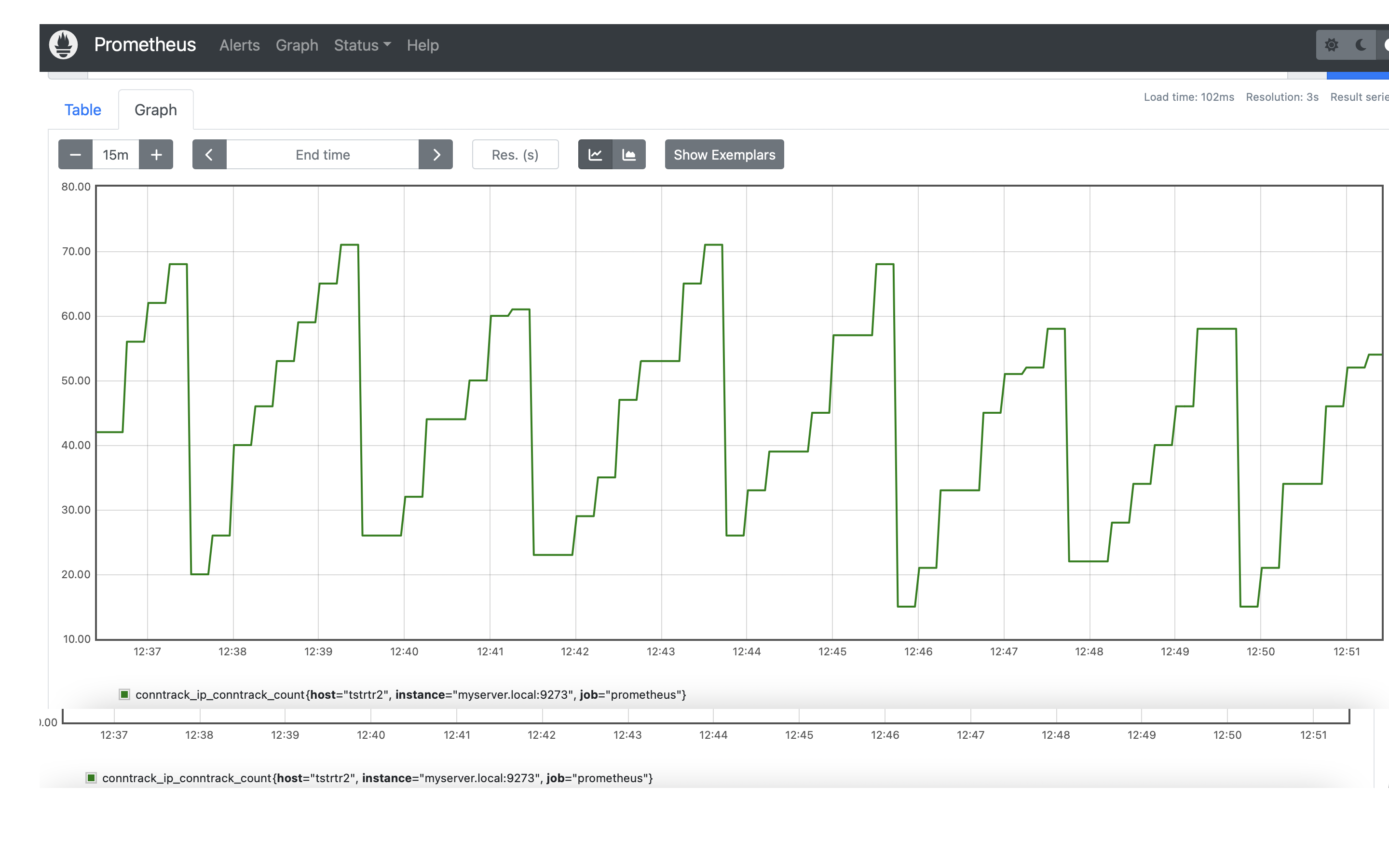
Could you also provide cat /var/lib/dhcp/dhclient_eth4.leases ?
no-default-route ignore just option routers and don't touch other options like classless-static-routes
https://github.com/vyos/vyos-1x/blob/2c29a3b3b46c7570f4a509f413b208348c0ce647/data/templates/dhcp-client/ipv4.tmpl#L18-L19
May 2 2022
Apr 28 2022
Apr 27 2022
@RyVolodya could you recheck it?
Try to replace option restart to reload-or-restart and re-configure from scratch, it may help.
https://github.com/vyos/vyos-1x/blob/363ecfa46cdb8402ea71637717863f01b09f428b/src/conf_mode/protocols_nhrp.py#L107
It is not only for dhcp, any service can be affected to this
There are no many check when we remove interface
@fernando Does it work if you "reload" configuration?
Apr 26 2022
Works as expected
@pyaskowski try zone-policy firewall
Fixed VyOS 1.4-rolling-202204260601
set nat source rule 10 destination port '!22,telnet,http,123,1001-1005'
nft:
oifname "eth4" tcp dport != { 22-23, 80, 123, 1001-1005 } counter packets 0 bytes 0 masquerade comment "SRC-NAT-10"VyOS 1.3.1-S1 is not affected:
table ip nat {
	chain PREROUTING {
		type nat hook prerouting priority dstnat; policy accept;
		counter packets 1 bytes 112 jump VYATTA_PRE_DNAT_HOOK
	}
Apr 25 2022
Working fine in VyOS 1.4-rolling-202204250217
Apr 24 2022
Apr 23 2022
I can't reproduce it VyOS 1.4-rolling-202204230217
Apr 22 2022
Apr 19 2022
Script for testing which fix some bugs with DMVPN
Proposed CLI:
set service dhcpv6-server global-parameters cisco-voip width 2
set service dhcpv6-server global-parameters cisco-voip length-width 2
set service dhcpv6-server global-parameters cisco-voip tftp-servers
set service dhcpv6-server shared-network-name Lan-v6-02 subnet 2001:db8:23::/64 cisco-voip tftp-server xx:xx:xx
Related to task T2196
Also there can be an issue if you get by DHCP non external addresses which behind nat.
So you need some external scripts which will give you your external address, like
curl ifconfig.me
Set destination external address, it is required. In other case you set all traffic to local server.
I didn't test it, but you need something like this or combinations..
set policy route MARK-80-eth0 rule 10 destination port '80'
set policy route MARK-80-eth0 rule 10 protocol 'tcp'
set policy route MARK-80-eth0 rule 10 set mark '100'
set policy route MARK-80-eth0 rule 10 set table '100'
Fixed
vyos@vyos:~$ show conf com | match dhcp
set service dhcp-server shared-network-name NET_01 authoritative
set service dhcp-server shared-network-name NET_01 name-server '1.1.1.1'
set service dhcp-server shared-network-name NET_01 subnet 192.0.2.0/24 range R1 start '192.0.2.21'
set service dhcp-server shared-network-name NET_01 subnet 192.0.2.0/24 range R1 stop '192.0.2.254'
vyos@vyos:~$
vyos@vyos:~$ show dhcp server leases
IP address    Hardware address    State    Lease start          Lease expiration     Remaining    Pool    Hostname
------------  ------------------  -------  -------------------  -------------------  -----------  ------  ----------
192.0.2.27    50:08:00:06:00:02   active   2022/04/19 12:04:19  2022/04/20 12:04:19  23:59:27     NET_01  vyos
vyos@vyos:~$
vyos@vyos:~$ show dhcp server statistics
Pool      Size    Leases    Available  Usage
------  ------  --------  -----------  -------
NET_01     234         1          233  0%
vyos@vyos:~$
Apr 18 2022
At least dhcpv6 address assign correctly, VyOS 1.4-rolling-202204162001
set interfaces ethernet eth2 address 'dhcp'
set interfaces ethernet eth2 address 'dhcpv6'
set interfaces ethernet eth3 address 'dhcp'
set interfaces ethernet eth3 address 'dhcpv6'
Show interfaces:
vyos@vyos:~$ show int
Codes: S - State, L - Link, u - Up, D - Down, A - Admin Down
Interface        IP Address                        S/L  Description
---------        ----------                        ---  -----------
eth0             -                                 u/u
eth1             -                                 u/u
eth2             100.64.20.21/24                   u/u  WAN01
                 2001:db8:23::934f/128
eth3             100.64.30.21/24                   u/u  WAN02
2001:db8::934f/128It was a lot of issues with it in openvpn.
So we decide to avoid to use raw options
Let us know which options do you need?
udpate PR for 1.3 https://github.com/vyos/vyos-1x/pull/1288
Apr 15 2022
Apr 14 2022
Large packets fastnetmon/podman
Apr 13 2022
For some reason is_bond_member is not in the configuration after the description
eth2 with option is_bond_member
eth3 without option is_bond_member
############## MY DEBUG START:
{'description': 'fofof',
 'duplex': 'auto',
 'hw_id': '50:08:00:01:00:03',
 'ifname': 'eth3',
 'ip': {'arp_cache_timeout': '30'},
 'mtu': '1500',
 'speed': 'auto'}
####### MY DEBUG END #######
Apr 11 2022
teleport Linux 64-bit DEB - 94 Mb
https://goteleport.com/teleport/download/
Apr 10 2022
Apr 8 2022
@fortinj1354 you can do changes in xml, build .deb pkg and install it on the instance
https://docs.vyos.io/en/equuleus/contributing/build-vyos.html#id4
PR for 1.3 https://github.com/vyos/vyos-1x/pull/1280
I missed option network vlan:
set service ipoe-server interface eth2 network 'vlan'
configs looks good:
[ipoe]
verbose=1
interface=re:eth2\.\d+,shared=0,mode=L2,ifcfg=1,range=192.168.0.0/24,start=dhcpv4,ipv6=1
username=ifname
password=csid
proxy-arp=1