Apr 12 2020
Apr 11 2020
@blackmetal provide, please flow accounting configuration show configuration commands | strip-private | match flow for reproducing
Apr 10 2020
Apr 8 2020
PR for this task https://github.com/vyos/vyos-1x/pull/313
Apr 7 2020
Apr 6 2020
vyos@R3# run show version all | match strongswan
ii  strongswan                       5.7.2-1                             all          IPsec VPN solution metapackage
But in this case, we have an issue with command
vyos@R3# sudo ip link add tun0 type gretap local 0.0.0.0
RTNETLINK answers: File exists
In old scripts, tunnels were created by following commands
ip tunnel add tun0 local 0.0.0.0 mode gre key 1 ttl 255 tos inherit
ip link set tun0 multicast on allmulticast on up
ip addr add 10.0.0.4/24 broadcast + dev tun0
ip tunnel cha tun0 local 0.0.0.0
The main reason for this issue - we can't create properly tunnel
set interfaces tunnel tun0 address 10.0.0.3/24
set interfaces tunnel tun0 encapsulation gre
set interfaces tunnel tun0 local-ip 0.0.0.0
set interfaces tunnel tun0 multicast enable
set interfaces tunnel tun0 parameters ip key 1
@c-po let me reproduce this locally, I will find an answer.
Apr 5 2020
vyos@R7# run show configuration commands | match "mpls|address|ospf"
set interfaces dummy dum0 address '1.1.1.1/32'
set interfaces ethernet eth1 address '10.0.0.1/24'
set protocols mpls ldp discovery transport-ipv4-address '1.1.1.1'
set protocols mpls ldp interface 'eth1'
set protocols mpls ldp router-id '1.1.1.1'
set protocols ospf area 0 network '0.0.0.0/0'
set protocols ospf parameters abr-type 'cisco'
set protocols ospf parameters router-id '1.1.1.1'
set interfaces dummy dum0 address '2.2.2.2/32'
set interfaces ethernet eth1 address '10.0.0.2/24'
set interfaces ethernet eth2 address '10.0.255.1/24'
set protocols mpls ldp discovery transport-ipv4-address '2.2.2.2'
set protocols mpls ldp interface 'eth1'
set protocols mpls ldp interface 'eth2'
set protocols mpls ldp router-id '2.2.2.2'
set protocols ospf area 0 network '0.0.0.0/0'
set protocols ospf parameters abr-type 'cisco'
set protocols ospf parameters router-id '2.2.2.2'
set interfaces dummy dum0 address '3.3.3.3/32'
set interfaces ethernet eth1 address '10.0.255.2/24'
set protocols mpls ldp discovery transport-ipv4-address '3.3.3.3'
set protocols mpls ldp interface 'eth1'
set protocols mpls ldp router-id '3.3.3.3'
set protocols ospf area 0 network '0.0.0.0/0'
set protocols ospf parameters abr-type 'cisco'
set protocols ospf parameters router-id '3.3.3.3'
Apr 4 2020
Add support PIM dr-priority (Designated Router Election Priority) and IGMP join
https://github.com/vyos/vyos-1x/pull/304
1.3 rolling does not affect.
PR for CRUX https://github.com/vyos/vyatta-cfg-system/pull/122
Apr 1 2020
Ok, as a workaround you can you.
set nat destination rule 102 source address !192.168.68.0/24
One question, I don't understand why we can't use only port 80 without this dynamic WAN IP address. In any case, you have inbound interface and port, I think this will be enough.
Mar 31 2020
Successfully tested on 1.2.5-epa2 and 1.3-rolling-202003310117
Without source ip address from local prefix strongswan can't create route in table 220. I'm not sure that we need to check and decline a commit. But we can show warning message.
Interfaces on boot have more priority and it can guarantee that if in router exist ip address from local prefix, strongswan will create the route,
When interface configured after IPSec, need run restart vpn for add routes.
I propose to add the following code to https://github.com/vyos/vyatta-cfg-vpn/blob/current/scripts/vpn-config.pl#L670
my $check_local_route = qx(ip route show table 254 $ocalsubnet_object);
if (!$check_local_route){
    print "Warning: local prefix $localsubnet_object specified for peer \"$peer\"\n";
    print "is not configured on any interfaces\n";
}@c-po do you have any updates?
Mar 30 2020
Mar 28 2020
@c-po this is operation commands, as I understand you propose to write py script with return_effective_ , correct?
Mar 27 2020
Mar 26 2020
Mar 24 2020
Mar 22 2020
@dmbaturin can you look 2 PR for implement option with ignore old transaction-script states?
https://github.com/vyos/vyos-1x/pull/255
https://github.com/vyos/vyos-replace/pull/7
Can we add this in 1.2.6?
Mar 21 2020
Following script more appreciated
/run/atop/atop.acct {
	rotate 0
	nomissingok
	size 100M
	postrotate
		PIDFILE=/run/atop.pid
		if [ -e $PIDFILE ] && \
			ps -p `cat $PIDFILE` | grep 'atop$' > /dev/null
		then
			kill -15 `cat $PIDFILE`
			rm $PIDFILE
		fi
		sleep 1
		/etc/init.d/atop restart
	endscript
}Sometimes we use this for detecting memleak and some clients issues with high CPU load. When we get users /var/log/atop* then we can reproduce locally and find wrong process, memleaking etc.
Mar 20 2020
Thanks @syncer and @c-po . As I understand logrotate run once per day. I hope this will be enough
vyos@vyos:~# ls /etc/cron.daily/ | grep logro
logrotate
vyos@vyos:~# cat /etc/crontab | grep daily
25 6	* * *	root	test -x /usr/sbin/anacron || ( cd / && run-parts --report /etc/cron.daily )
So, now I have logrotate script for atop on my test router
cat /etc/logrotate.d/atop
/run/atop/atop.acct {
	rotate 0
	nomissingok
	size 50M
	postrotate
		/etc/init.d/atop restart
	endscript
}
With manually run, seems all works
logrotate /etc/logrotate.d/atop --verbose
reading config file /etc/logrotate.d/atop
Mar 19 2020
Mar 18 2020
Some tests results
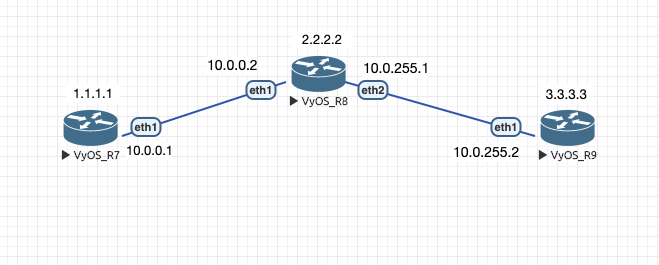
vyos@R8:~$ show configuration commands | match mpls
set protocols mpls ldp discovery transport-ipv4-address '2.2.2.2'
set protocols mpls ldp interface 'eth1'
set protocols mpls ldp interface 'eth2'
set protocols mpls ldp router-id '2.2.2.2'
vyos@R8:~$ show mpls ldp neighbor
AF   ID              State       Remote Address    Uptime
ipv4 10.0.0.1        OPERATIONAL 10.0.0.1        00:00:22
ipv4 3.3.3.3         OPERATIONAL 10.0.255.2      00:00:33
vyos@R8:~$ show mpls ldp interface
AF   Interface   State  Uptime   Hello Timers  ac
ipv4 eth1        ACTIVE 00:00:51 5/15           1
ipv4 eth2        ACTIVE 00:00:52 5/15           1
2 PR for basic MPLS implementation
https://github.com/vyos/vyos-build/pull/90
https://github.com/vyos/vyos-1x/pull/247
Mar 15 2020
PR for CRUX https://github.com/vyos/vyatta-wireless/pull/14
Tested on 1.2.5-epa1 own build ISO.
sudo cat /var/log/vyatta/vyatta-commit.log
[ interfaces wireless wlan0 ]
Warning! system : missing regulatory domain country code
Mar 13 2020
Successfully tested on VyOS 1.2.5-epa1
@rherold do you have any additional info how I can reproduce this issue?
Works properly on VyOS 1.2.5-epa1 (FRRouting 7.2-20200121-02-g031c58) and 1.3-rolling-202003130217(FRRouting 7.3)
Mar 12 2020
Thanks @jestabro , works well with this change. After passing all the tests, I will write docs about VyOS in container.
Works correct on the latest rolling.
Mar 9 2020
Hi @SteveP , VyOS has own CLI for ping command, use ping and <TAB>
vyos@R1:~$ ping 1.1.1.1
Possible completions:
  <Enter>       Execute the current command
  adaptive      Ping options
  allow-broadcast
  audible
  bypass-route
  count
  deadline
  flood
  interface
  interval
  mark
  no-loopback
  numeric
  pattern
  quiet
  record-route
  size
  timestamp
  tos
  ttl
  verbose
Mar 6 2020
Mar 5 2020
Mar 3 2020
@c-po can you look https://github.com/vyos/vyos-1x/pull/236
Feb 28 2020
Feb 27 2020
Feb 24 2020
PR for 1.3-rolling https://github.com/vyos/vyos-1x/pull/228
@hagbard thanks, works as expected. I think this might be backport candidate to 1.2.X
Feb 23 2020
Feb 14 2020
Feb 12 2020
Feb 4 2020
Feb 2 2020
Feb 1 2020
Related with https://phabricator.vyos.net/T1842 I think we need pytz
Jan 30 2020
Fixed for current branch but not for crux. Need cherry-pick this.
Jan 28 2020
Jan 27 2020
@hagbard, thank you! This feature works properly, last value define how many sessions server can to serve
works as expected on 1.3-rolling-202001270217
Jan 24 2020
PR https://github.com/vyos/vyos-1x/pull/209
also added missing completion help values.