Tested in VyOS 2025.08.25-0020-rolling and works as expected.
Below are the test results:
Feed Search
Aug 27 2025
Aug 27 2025
a.hajiyev added a comment to T7660: VPP fails to commit on AWS unless vfio module is manually loaded.
Aug 14 2025
Aug 14 2025
a.hajiyev updated the task description for T7712: NIC issue when deploying VyOS instance with multiple NICs on Azure.
a.hajiyev updated the task description for T7712: NIC issue when deploying VyOS instance with multiple NICs on Azure.
Aug 13 2025
Aug 13 2025
Jul 25 2025
Jul 25 2025
a.hajiyev updated the task description for T7661: VPP fails to load XDP on AWS with ena driver.
May 28 2025
May 28 2025
a.hajiyev reopened T7161: "redistribute table" option in BGP does not work correctly as "Open".
a.hajiyev added a comment to T7161: "redistribute table" option in BGP does not work correctly.
May 19 2025
May 19 2025
a.hajiyev added a comment to T6516: ISIS - advertise-passive-only not install route in the RIB.
Tested in VyOS 2025.03.09-0613-rolling the issue persists
Configuration:
a.hajiyev added a comment to T6963: FRR config is lost upon daemon restart.
Tested in VyOS 2025.05.13-0019-rolling, issue resolved.
May 16 2025
May 16 2025
a.hajiyev added a comment to T6963: FRR config is lost upon daemon restart.
Tested in VyOS 1.4.2 problem persists
Apr 30 2025
Apr 30 2025
Mar 12 2025
Mar 12 2025
a.hajiyev added a comment to T7234: Local User Commits Get Stuck When TACACS Servers Are Unavailable.
I tested the same scenario in VyOS 2025.03.09-0613-rolling and did not observe the same issue.
VyOS works as expected and commit did not get stuck.
a.hajiyev removed a project from T7234: Local User Commits Get Stuck When TACACS Servers Are Unavailable: VyOS 1.5 Circinus.
Mar 11 2025
Mar 11 2025
a.hajiyev renamed T7234: Local User Commits Get Stuck When TACACS Servers Are Unavailable from Local User Commits Get Stuck When Takacs Servers Are Unavailable to Local User Commits Get Stuck When TACACS Servers Are Unavailable.
Dec 19 2024
Dec 19 2024
a.hajiyev added a comment to T6963: FRR config is lost upon daemon restart.
There are around 300 interfaces:
- around 200 vxlan interface
- around 30 bridge interfaces
- around 30 Pseudo-Ethernet/MACvlan interfaces
- around 16 Ethernet interfaces
- around 30 Bridge interfaces
Nov 14 2024
Nov 14 2024
Oct 28 2024
Oct 28 2024
Oct 24 2024
Oct 24 2024
Oct 23 2024
Oct 23 2024
a.hajiyev updated the task description for T6807: Afer the migration from 1.3.x to 1.4.0 "/" character at the end of the users home directory path breaks login.
Oct 3 2024
Oct 3 2024
Sep 18 2024
Sep 18 2024
a.hajiyev updated the task description for T6724: Integrate directory integrity checker to detect and find installed 3rd party packets.
Aug 23 2024
Aug 23 2024
a.hajiyev added a comment to T6673: Unexpected error when restart container via native Podman command.
Only worked:
- Reboot instance
- load /config/config.boot
- sudo podman rm suricata
- commit
Then it works
vyos@VyOS-Test01#
[edit]
vyos@VyOS-Test01# load /config/config.boot
[edit]
vyos@VyOS-Test01#
[edit]
vyos@VyOS-Test01# compare
+ container {
+     name suricata {
+         allow-host-networks
+         arguments "-q 1"
+         capability "net-admin"
+         capability "sys-admin"
+         capability "sys-nice"
+         image "jasonish/suricata:6.0.14"
+         memory "1024"
+         volume ETC {
+             destination "/etc/suricata"
+             source "/config/suricata/etc"
+         }
+         volume LOGS {
+             destination "/var/log/suricata"
+             source "/config/suricata/logs"
+         }
+         volume RULES {
+             destination "/var/lib/suricata/rules/"
+             source "/config/suricata/rules"
+         }
+     }
+ }a.hajiyev reopened T6673: Unexpected error when restart container via native Podman command as "Open".
a.hajiyev added a comment to T6673: Unexpected error when restart container via native Podman command.
If service is 'failed' state
vyos@VyOS-Test01:~$ systemctl status vyos-container-suricata.service
× vyos-container-suricata.service - VyOS Container suricata
     Loaded: loaded (/run/systemd/system/vyos-container-suricata.service; static)
     Active: failed (Result: exit-code) since Fri 2024-08-23 10:32:44 UTC; 43s ago
   Duration: 4min 55.702s
    Process: 2855 ExecStartPre=/bin/rm -f /run/vyos-container-suricata.service.pid /run/vyos-container-suricata.service.cid (code=exited, sta>
    Process: 2856 ExecStart=/usr/bin/podman run --conmon-pidfile /run/vyos-container-suricata.service.pid --cidfile /run/vyos-container-suric>
    Process: 2867 ExecStopPost=/usr/bin/podman rm --ignore -f --cidfile /run/vyos-container-suricata.service.cid (code=exited, status=0/SUCCE>
    Process: 2873 ExecStopPost=/bin/rm -f /run/vyos-container-suricata.service.cid (code=exited, status=0/SUCCESS)
CPU: 129msa.hajiyev added a comment to T6673: Unexpected error when restart container via native Podman command.
You are right there is an op-mode command to restart the container
restart container suricata
But I think there needs to be some checks/changes at least someone will execute the native Podman command to restart the container.
Aug 15 2024
Aug 15 2024
Jul 1 2024
Jul 1 2024
May 28 2024
May 28 2024
Apr 9 2024
Apr 9 2024
Jan 11 2024
Jan 11 2024
a.hajiyev added a comment to T3191: PAM RADIUS freezing when accounting does not configured on RADIUS server.
Tested in VyOS 1.4.0-rc1 , VyOS 1.3.5 and VyOS 1.5-rolling-202401030023
The configuration
VyOS 1.4.0-rc1:
Nov 30 2023
Nov 30 2023
a.hajiyev added a comment to T5004: DHCP-Relay potential bug. Static configurations of DHCP-Relay Interfaces.
Tested in VyOS 1.3.4
a.hajiyev added a comment to T4601: dhcp : relay agent IP address issue..
Tested in VyOS 1.3.4
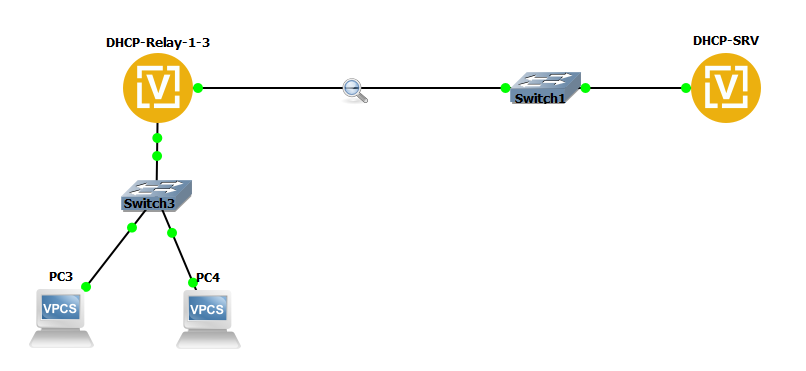
a.hajiyev added a comment to T4601: dhcp : relay agent IP address issue..
Tested in VyOS 1.4-rolling-202311100309
Nov 29 2023
Nov 29 2023
a.hajiyev added a comment to T5004: DHCP-Relay potential bug. Static configurations of DHCP-Relay Interfaces.
Tested in VyOS 1.4-rolling-202311100309
Nov 28 2023
Nov 28 2023
a.hajiyev added a comment to T4276: IPsec peers dh-group negotiation issue with pfs enabled and multiple proposals configured with IKEv1.
Tested on VyOS 1.4-rolling-202311100309
- IKEv1
- 2 proposals
- the pfs is enabled
Nov 24 2023
Nov 24 2023
a.hajiyev updated the task description for T5778: The show dhcp server leases operation mode command does not work as expected.
a.hajiyev updated the task description for T5778: The show dhcp server leases operation mode command does not work as expected.
a.hajiyev updated the task description for T5778: The show dhcp server leases operation mode command does not work as expected.
Nov 23 2023
Nov 23 2023
a.hajiyev added a comment to T4891: BFD flapping loop.
Tested in VyOS 1.4-rolling-202311100309:
a.hajiyev added a comment to T4867: "show bgp neighbors ... advertised-routes" and some other commands fail for IPv4 neighbors.
Tested in VyOS 1.4-rolling-202311100309
Configs:
Node-1
Nov 22 2023
Nov 22 2023
a.hajiyev closed T4021: Long commit time on bridge interface with 1-4094 allowed VLAN tags as Resolved.
a.hajiyev added a comment to T4021: Long commit time on bridge interface with 1-4094 allowed VLAN tags.
Tested on VyOS 1.4-rolling-202311100309:
a.hajiyev added a comment to T3818: BGP export route-map only works after bgpd restart.
Tested in VyOS 1.4-rolling-202311100309:
The configuration:
a.hajiyev removed a project from T2845: BGP conf_mode unable to delete configuration with peer-group: VyOS 1.4 Sagitta.
a.hajiyev added a comment to T2845: BGP conf_mode unable to delete configuration with peer-group.
Tested in VyOS 1.4-rolling-202311100309
The configuration:
VyOS:
Nov 20 2023
Nov 20 2023
a.hajiyev added a comment to T2737: DHCP Lease not displayed with a static map.
Tested in VyOS 1.4-rolling-202311100309:
Configurations:
a.hajiyev changed the status of T2816: Rewrite IPsec scripts with the new XML/Python approach from In progress to Open.
a.hajiyev added a comment to T2816: Rewrite IPsec scripts with the new XML/Python approach.
Tested on VyOS 1.4-rolling-202311100309 and VyOS 1.5-rolling-202311160736 - L-Time shows 0. But supposed to show 3600 according to the configuration.
Nov 16 2023
Nov 16 2023
a.hajiyev changed the status of T2816: Rewrite IPsec scripts with the new XML/Python approach from Needs testing to In progress.
a.hajiyev added a comment to T2816: Rewrite IPsec scripts with the new XML/Python approach.
Tested in VyOS 1.4-rolling-202311100309 (AES)
a.hajiyev added a comment to T2816: Rewrite IPsec scripts with the new XML/Python approach.
Tested in VyOS 1.4-rolling-202311100309 (3DES)
a.hajiyev added a comment to T3763: wireguard checks if port already binding.
In VyOS 1.3.4
Configs:
a.hajiyev added a comment to T3763: wireguard checks if port already binding.
I tested in VyOS 1.4-rolling-202311100309
a.hajiyev added a comment to T3638: Passwords With Dollar Sign Set Incorrectly.
Tested in VyOS 1.4-rolling-202311100309
Tried with single quotes: ''
Nov 15 2023
Nov 15 2023
a.hajiyev added a comment to T1276: dhcp relay + VLAN fails.
Tested VyOS 1.4-rolling-202311100309
Oct 25 2023
Oct 25 2023
a.hajiyev added a comment to T5665: radius user not working.
Used one of the latest rolling releases.
Configured the Radius server and VyOS
Oct 24 2023
Oct 24 2023
a.hajiyev added a comment to T4867: "show bgp neighbors ... advertised-routes" and some other commands fail for IPv4 neighbors.
Checked in VyOS 1.4-rolling-202310030309
a.hajiyev added a comment to T3722: op-mode IPSec show vpn ike sa always shows L-TIME 0.
LEFT router configuration
Aug 15 2023
Aug 15 2023
a.hajiyev updated the task description for T5473: Detect what conflicts with POSIX mode.
a.hajiyev updated the task description for T5473: Detect what conflicts with POSIX mode.
Aug 14 2023
Aug 14 2023
a.hajiyev updated the task description for T5473: Detect what conflicts with POSIX mode.
Jul 27 2023
Jul 27 2023