Duplicate T4359
Feed All Stories
May 8 2022
May 8 2022
GitHub <noreply@github.com> committed rVYOSONEXa9f2a2ed73aa: Merge pull request #1309 from dmbaturin/T4402-equ (authored by dmbaturin).
GitHub <noreply@github.com> committed rVYOSONEX0c00e7bf8b6e: T4405: Fix administrative distance of DHCP routes (authored by dtoux).
GitHub <noreply@github.com> committed rVYOSONEX84f68455cbe9: Merge pull request #1313 from dtoubelis/equuleus (authored by dmbaturin).
Viacheslav added a comment to T4415: Include license/copyright files in the image but remove user documentation from /usr/share/doc to reduce its size.
Viacheslav changed the status of T4416: Convert 'traceroute' operation to the new syntax and expand available options using python from Open to Needs testing.
May 7 2022
May 7 2022
c-po moved T4361: `vyos.config.exists()` does not work for nodes with multiple values from In Progress to Finished on the VyOS 1.3 Equuleus (1.3.2) board.
c-po moved T4354: Slave interfaces fall out from bonding during configuration change from Need Triage to Finished on the VyOS 1.3 Equuleus (1.3.2) board.
c-po edited projects for T4354: Slave interfaces fall out from bonding during configuration change, added: VyOS 1.3 Equuleus (1.3.2); removed VyOS 1.3 Equuleus.
c-po moved T4354: Slave interfaces fall out from bonding during configuration change from Open to Finished on the VyOS 1.4 Sagitta board.
c-po changed the status of T4419: vrf: support to disable IP forwarding within a given VRF from Open to In progress.
c-po committed rVYOSONEXd903c9b43225: smoketest: T4354: Add test for uniq bonding members (authored by Viacheslav).
GitHub <noreply@github.com> committed rVYOSONEX56764361d87a: Merge pull request #1318 from c-po/t4361-equuleus-backport (authored by dmbaturin).
May 6 2022
May 6 2022
c-po added a comment to T4361: `vyos.config.exists()` does not work for nodes with multiple values.
PR for VyOS 1.3 https://github.com/vyos/vyos-1x/pull/1318
c-po added a comment to T4354: Slave interfaces fall out from bonding during configuration change.
1.3 fix via https://github.com/vyos/vyos-1x/pull/1318
skor added a comment to T4417: VRRP doesn't start with conntrack-sync.
c-po moved T4361: `vyos.config.exists()` does not work for nodes with multiple values from In Progress to Finished on the VyOS 1.4 Sagitta board.
c-po moved T4361: `vyos.config.exists()` does not work for nodes with multiple values from Need Triage to In Progress on the VyOS 1.3 Equuleus (1.3.2) board.
c-po edited projects for T4361: `vyos.config.exists()` does not work for nodes with multiple values, added: VyOS 1.3 Equuleus (1.3.2); removed VyOS 1.3 Equuleus.
n.fort added a comment to T4362: Wan Load Balancing - Can't create routing tables.
I was able to reproduce issue on latest VyOS 1.4-rolling-202205060217
Steps to reproduce:
1 - Fresh/clean vyos router
2 - Add interface configuration (dhcp on WANs and static IP addresses on LAN side), commit and save
3 - Add next WLB configuration:
Viacheslav changed the status of T4410: Telegraf - Output to Splunk from Needs testing to In progress.
Viacheslav changed the status of T4418: Telegraf - output Plugin azure-data-explorer from Open to In progress.
Viacheslav added a comment to T4418: Telegraf - output Plugin azure-data-explorer.
GitHub <noreply@github.com> committed rVYOSONEXfb48da5f61da: Merge pull request #1316 from srividya0208/T4381 (authored by c-po).
Viacheslav added a comment to T4417: VRRP doesn't start with conntrack-sync.
Try to delete sync-group, as you use only one group
May 5 2022
May 5 2022
c-po committed rVYOSONEX55d2ee80dcdd: op-mode: T4416: Rewrite 'traceroute' op-command and expand available options… (authored by 3roin <e.khudiyev@live.com>).
GitHub <noreply@github.com> committed rVYOSONEXc1757b0f420b: Merge pull request #1312 from sever-sever/T4410 (authored by c-po).
c-po added a comment to T4414: Add route-map "as-path prepend last-as x" option.
Implemented as set policy route-map FOO rule 10 set as-path prepend-last-as 2
Viacheslav edited projects for T4315: Telegraf - Output to prometheus, added: VyOS 1.3 Equuleus (1.3.2); removed VyOS 1.3 Equuleus ( 1.3.1).
Viacheslav added a comment to T4315: Telegraf - Output to prometheus.
PR for 1.3 https://github.com/vyos/vyos-1x/pull/1315
zsdc changed the status of T4415: Include license/copyright files in the image but remove user documentation from /usr/share/doc to reduce its size from Open to In progress.
PR for 1.3: https://github.com/vyos/vyos-build/pull/231
PR for 1.4: https://github.com/vyos/vyos-build/pull/230
Viacheslav moved T4315: Telegraf - Output to prometheus from Open to Finished on the VyOS 1.4 Sagitta board.
Viacheslav added a comment to T4414: Add route-map "as-path prepend last-as x" option.
In 1.4 it working
set policy route-map FOO rule 10 action 'permit'
set policy route-map FOO rule 10 set as-path-prepend 'last-as 2'
dtoux added a comment to T4405: DHCP client sometimes ignores `no-default-route` option of an interface.
I've creatred a pull request for the above - https://github.com/vyos/vyos-1x/pull/1313
May 4 2022
May 4 2022
c-po updated the task description for T4412: commit archive: reboot not working with sftp.
c-po updated the task description for T4412: commit archive: reboot not working with sftp.
c-po updated the task description for T4412: commit archive: reboot not working with sftp.
dtoux updated the task description for T4405: DHCP client sometimes ignores `no-default-route` option of an interface.
Viacheslav added a comment to T4410: Telegraf - Output to Splunk.
Viacheslav renamed T4411: Add migration for service monitoring telegraf influxdb from Add migration for service monitoring influxdb to Add migration for service monitoring telegraf influxdb.
Viacheslav changed the status of T4315: Telegraf - Output to prometheus from In progress to Needs testing.
Viacheslav added a comment to T4362: Wan Load Balancing - Can't create routing tables.
I can't reproduce it
With such configuration all works fine VyOS 1.4-rolling-202204300743:
set load-balancing wan interface-health eth4 failure-count '5'
set load-balancing wan interface-health eth4 nexthop 'dhcp'
set load-balancing wan interface-health eth4 success-count '1'
set load-balancing wan interface-health eth4 test 10 target '192.0.2.40'
set load-balancing wan interface-health eth5 failure-count '5'
set load-balancing wan interface-health eth5 nexthop 'dhcp'
set load-balancing wan interface-health eth5 success-count '1'
set load-balancing wan interface-health eth5 test 10 target '192.0.2.50'
set load-balancing wan interface-health eth6 failure-count '5'
set load-balancing wan interface-health eth6 nexthop 'dhcp'
set load-balancing wan interface-health eth6 success-count '1'
set load-balancing wan interface-health eth6 test 10 target '192.0.2.60'
set load-balancing wan rule 10 failover
set load-balancing wan rule 10 inbound-interface 'eth7'
set load-balancing wan rule 10 interface eth4
set load-balancing wan rule 10 interface eth5
set load-balancing wan rule 10 interface eth6
set load-balancing wan rule 10 protocol 'all'
set load-balancing wan sticky-connections
Viacheslav added a comment to T4408: Add sshguard to protect against brut-forces.
Configuration
# cat /etc/sshguard/sshguard.conf
#### REQUIRED CONFIGURATION ####
# Full path to backend executable (required, no default)
BACKEND="/usr/lib/x86_64-linux-gnu/sshg-fw-nft-sets"
May 3 2022
May 3 2022
blackhole added a comment to T4362: Wan Load Balancing - Can't create routing tables.
If it helps, I am also getting the exact same errors and problems, would love to see this working please
Viacheslav changed the status of T4380: Feature Request: ocserv: 2FA OTP key generator in VyOS CLI from In progress to Needs testing.
GitHub <noreply@github.com> committed rVYOSONEX0400f96c003c: Merge pull request #1310 from sever-sever/T4315 (authored by c-po).
zsdc changed the status of T4407: Network-config v2 is broken in Cloud-init 22.1 and VyOS 1.3 from Open to Needs testing.
Resolved in https://github.com/vyos/vyos-cloud-init/pull/54
dtoux added a comment to T4405: DHCP client sometimes ignores `no-default-route` option of an interface.
Also, these routes getting an administrative distance of 1, which is impossible to override. I believe the default route from DHCP normally has 210 which is manageable. So, the quick workaround could be increasing distance of these routes.
dtoux added a comment to T4405: DHCP client sometimes ignores `no-default-route` option of an interface.
r24:/home/dtoubelis# cat /var/lib/dhcp/dhclient_eth4.leases
lease {
  interface "eth4";
  fixed-address 100.123.57.53;
  option subnet-mask 255.192.0.0;
  option relay-agent-information 1:4:0:0:4:cf:5:4:64:40:0:1:97:8:1:0:14:ed:0:0:14:ed:98:0;
  option dhcp-lease-time 300;
  option routers 100.64.0.1;
  option dhcp-message-type 5;
  option domain-name-servers 1.1.1.1,8.8.8.8;
  option dhcp-server-identifier 100.64.0.1;
  option interface-mtu 1500;
  option rfc3442-classless-static-routes 32,192,168,100,1,0,0,0,0,32,34,120,255,244,0,0,0,0,0,100,64,0,1;
  renew 2 2022/05/03 12:42:00;
  rebind 2 2022/05/03 12:44:26;
  expire 2 2022/05/03 12:45:04;
}
lease {
  interface "eth4";
  fixed-address 100.123.57.53;
  option subnet-mask 255.192.0.0;
  option relay-agent-information 1:4:0:0:4:cf:5:4:64:40:0:1:97:8:1:0:14:ed:0:0:14:ed:98:0;
  option dhcp-lease-time 300;
  option routers 100.64.0.1;
  option dhcp-message-type 5;
  option domain-name-servers 1.1.1.1,8.8.8.8;
  option dhcp-server-identifier 100.64.0.1;
  option interface-mtu 1500;
  option rfc3442-classless-static-routes 32,192,168,100,1,0,0,0,0,32,34,120,255,244,0,0,0,0,0,100,64,0,1;
  renew 2 2022/05/03 12:46:34;
  rebind 2 2022/05/03 12:48:50;
  expire 2 2022/05/03 12:49:28;
}
lease {
  interface "eth4";
  fixed-address 100.123.57.53;
  option subnet-mask 255.192.0.0;
  option relay-agent-information 1:4:0:0:4:cf:5:4:64:40:0:1:97:8:1:0:14:ed:0:0:14:ed:98:0;
  option dhcp-lease-time 300;
  option routers 100.64.0.1;
  option dhcp-message-type 5;
  option domain-name-servers 1.1.1.1,8.8.8.8;
  option dhcp-server-identifier 100.64.0.1;
  option interface-mtu 1500;
  option rfc3442-classless-static-routes 32,192,168,100,1,0,0,0,0,32,34,120,255,244,0,0,0,0,0,100,64,0,1;
  renew 2 2022/05/03 12:51:33;
  rebind 2 2022/05/03 12:53:25;
  expire 2 2022/05/03 12:54:03;
}
...
}Viacheslav added a comment to T4315: Telegraf - Output to prometheus.
Prometheus server pulls information correctly
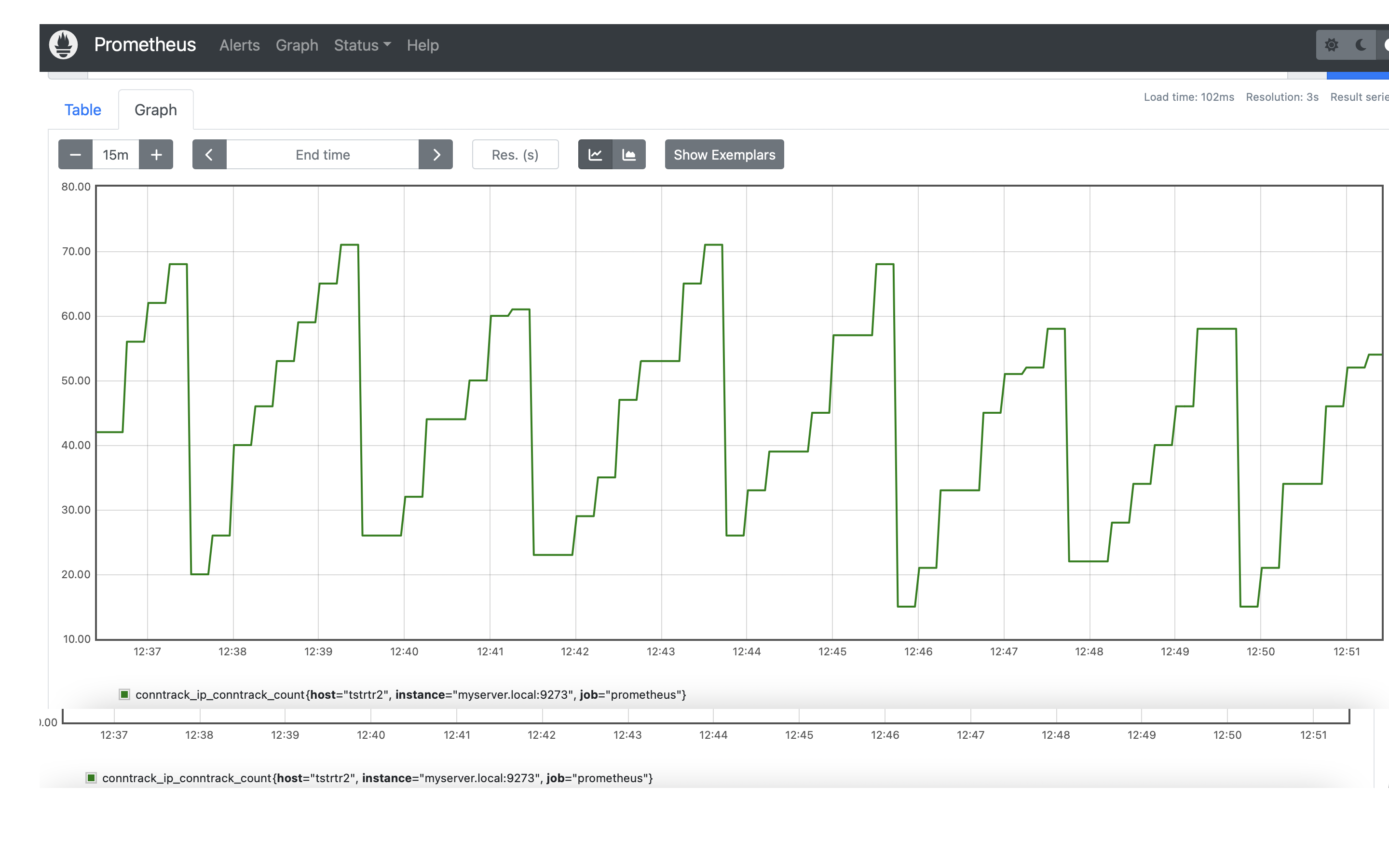
Viacheslav added a comment to T4405: DHCP client sometimes ignores `no-default-route` option of an interface.
Could you also provide cat /var/lib/dhcp/dhclient_eth4.leases ?
no-default-route ignore just option routers and don't touch other options like classless-static-routes
https://github.com/vyos/vyos-1x/blob/2c29a3b3b46c7570f4a509f413b208348c0ce647/data/templates/dhcp-client/ipv4.tmpl#L18-L19
dtoux added a comment to T4405: DHCP client sometimes ignores `no-default-route` option of an interface.
Below is a packet capture from DHCP exchange:
It seems that option 121 has more than one route. Could this be causing the abnormal behavior?
May 2 2022
May 2 2022
Viacheslav added a comment to T4315: Telegraf - Output to prometheus.
c-po added a comment to T4385: bgp: peer-group member cannot override remote-as of peer-group.
We also need to verify remote-as in v6only or interface definitions:
c-po reopened T4385: bgp: peer-group member cannot override remote-as of peer-group as "In progress".