VPP IPsec, not all clients could ping each other even if the IPsec connection in the UP state
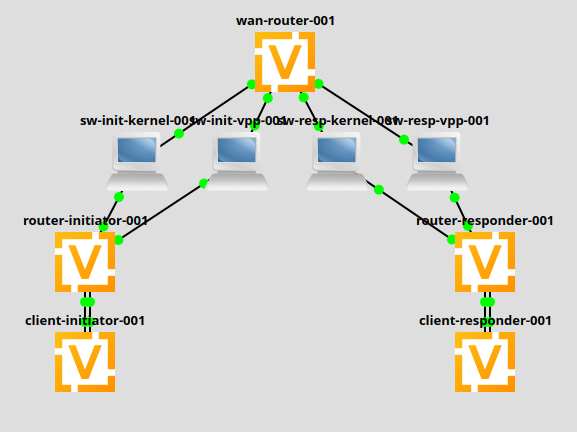
Routers configurations
As we can see the SAs in the operational mode
vyos@router-initiator-001:~$ show vpn ipsec connections | match "State|---|cfg_026"
Connection                            State    Type    Remote address    Local TS         Remote TS        Local id               Remote id              Proposal
------------------------------------  -------  ------  ----------------  ---------------  ---------------  ---------------------  ---------------------  ---------------------------------------
peer-responder-001-cfg_026            up       IKEv2   10.3.0.2          -                -                initiator-001-cfg_026  responder-001-cfg_026  AES_CBC/256/HMAC_SHA2_256_128/MODP_2048
peer-responder-001-cfg_026-vti        up       IPsec   10.3.0.2          172.16.39.0/24   172.17.39.0/24   initiator-001-cfg_026  responder-001-cfg_026  AES_CBC/256/HMAC_SHA2_256_128/None
vyos@router-initiator-001:~$
But real ping from the client-initiator to client-reponder fails:
vyos@client-initiator-001:~$ ping 172.17.39.10 source-address 172.16.39.10
PING 172.17.39.10 (172.17.39.10) from 172.16.39.10 : 56(84) bytes of data.
^C
--- 172.17.39.10 ping statistics ---
6 packets transmitted, 0 received, 100% packet loss, time 5101ms
Those remote sites are failing (check from the client-initiator):
ping 172.17.39.10 source-address 172.16.39.10
ping 172.17.43.10 source-address 172.16.43.10
ping 172.17.49.10 source-address 172.16.47.10
ping 172.17.50.10 source-address 172.16.47.10
ping 172.17.57.10 source-address 172.16.51.10
ping 172.17.63.10 source-address 172.16.57.10
ping 172.17.63.10 source-address 172.16.58.10
ping 172.17.67.10 source-address 172.16.65.10
ping 172.17.67.10 source-address 172.16.66.10
ping 172.17.73.10 source-address 172.16.73.10
ping 172.17.73.10 source-address 172.16.74.10
ping 172.17.74.10 source-address 172.16.73.10
ping 172.17.74.10 source-address 172.16.74.10
ping 172.17.81.10 source-address 172.16.81.10
ping 172.17.82.10 source-address 172.16.81.10
ping 172.17.81.10 source-address 172.16.82.10
ping 172.17.82.10 source-address 172.16.82.10
ping 172.17.87.10 source-address 172.16.87.10
ping 172.17.93.10 source-address 172.16.91.10
ping 172.17.94.10 source-address 172.16.91.10
ping 172.17.99.10 source-address 172.16.97.10
ping 172.17.99.10 source-address 172.16.98.10
ping 172.17.105.10 source-address 172.16.105.10
ping 172.17.106.10 source-address 172.16.105.10
ping 172.17.105.10 source-address 172.16.106.10
ping 172.17.106.10 source-address 172.16.106.10
If I remove VPP, all peers work as expected.