Will be great to have 802.1p CoS priority setting
Required by certain ISPs
Description
Description
Details
Details
- Version
- -
- Is it a breaking change?
- Perfectly compatible
- Issue type
- Feature (new functionality)
Related Objects
Related Objects
- Mentioned In
- Q16: 802.1P support (Answer 200)
Event Timeline
Comment Actions
information that can be useful for this feature request :
another more recent example :
https://www.lafois.com/2021/12/05/change-vlan-priority-using-linux-bridge/
Comment Actions
Some internal test where done, using integration between:
- Traffic shaper. Currently supported in vyos cli
- Bridge firewall. Currently not supported in vyos cli.
Comment Actions
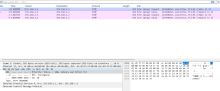
I was able to achieve the PCP set with different CoS value with subsystem tc of linux. Re-using the available options of QoS, it is possible to identify CoS values (L2 traffic) for ingress and egress. Let me explain how Linux performs the PCP values.
- Linux uses an internal priority called skb>priority (socket buffer priority) that map automatically the IP DSCP/TOS (Type of Service) → to linux skbpriority.
- Then, with an internal function called: ip_tos2prio maps the IP / TOS to kernel priority (sk_prio)
The correlation between the internal Linux priority (skb_priority) and IP/TOS is bidirectional. VyOS can identify and maps these two priority types between kernel and packet. The challenge is that VyOS CANNOT MODIFY THE INTERNAL KERNEL PRIORITY.
Our main goal: Classified specific traffic on skb priority first at linux level and then VyOS will be able to map to 802.1p CoS value using the TC linux subsystem
Let me show you an example for better understanding:
### Linux command ###
# Create VLAN interface
ip link add link eth0 name eth0.100 type vlan id 100
# Set egress QoS map: Linux priority → 802.1p CoS
ip link set eth0.100 type vlan egress-qos-map 0:0   # Best effort → CoS 0
ip link set eth0.100 type vlan egress-qos-map 6:5   # Linux prio 6 → VoIP CoS 5
ip link set eth0.100 type vlan egress-qos-map 7:6   # Linux prio 7 → CoS 6
ip link set eth0.100 up
### VyOS commands ###
/// classified all traffic to 1:a --> priority 6
set qos policy shaper VOICE-COS class 10 priority '6'
set qos policy shaper VOICE-COS class 10 queue-type 'fair-queue'
set qos policy shaper VOICE-COS class 10 match ALL ether protocol 'all'
/// Map from skb priority to CoS priority
set interfaces ethernet eth0 vif 10 egress-qos '6:5'
set qos interface eth0.10 egress 'VOICE-COS'
This is a basic Linux configuration to map from KERNEL PRIORITY to 802.1p CoS priority. What we need is to find a way to set a tc filter to set the internal priority to 6 or 7 or any internal priority. Next we find the Linux command tho achive this:
sudo tc qdisc del dev eth0.10 root
sudo tc qdisc add dev eth0.10 root handle 1: prio
sudo tc filter add dev eth0.10 parent 1:0 protocol all u32 \
    match u32 0 0 \
    action skbedit priority 6   --> The actual action to set traffic with skb pirority of 6.
So, with the existing configuration of VyOS, by only adding the action skbedit priority 6 command, it gives the action to mark traffic with an internal kernel priority of 6. It should be something like this on VyOS
set qos policy shaper TEST class 10 set-skbedit 6
This will allow the VyOS to create the highlighted Linux command in the previous sets of commands.
root@vyos:/home/vyos# sudo tc -d -s filter show dev eth0.10
/// tc filter created with Linux commands
filter parent 1: protocol all pref 5 u32 chain 0
filter parent 1: protocol all pref 5 u32 chain 0 fh 802: ht divisor 1
filter parent 1: protocol all pref 5 u32 chain 0 fh 802::800 order 2048 key ht 802 bkt 0 terminal flowid not_in_hw (rule hit 0 success 0)
  match 00000000/00000000 at 0 (success 0 )
        action order 1: skbedit  priority :6 pipe    --> Actuakl skbedit priority of 6
         index 1 ref 1 bind 1 installed 38 sec used 38 sec
        Action statistics:
        Sent 0 bytes 0 pkt (dropped 0, overlimits 0 requeues 0)
        backlog 0b 0p requeues 0
/// tc filter created with VyOS
filter parent 1: protocol all pref 6 u32 chain 0
filter parent 1: protocol all pref 6 u32 chain 0 fh 800: ht divisor 1
filter parent 1: protocol all pref 6 u32 chain 0 fh 800::800 order 2048 key ht 800 bkt 0 flowid 1:a not_in_hw (rule hit 0 success 0)
  match 00000000/00000000 at 0 (success 0 )
filter parent 1: protocol all pref 6 u32 chain 0 fh 800::801 order 2049 key ht 800 bkt 0 flowid 1:a not_in_hw (rule hit 0 success 0)
  match 00000000/00000000 at 0 (success 0 )
        action order 1:  police 0x1 rate 10Gbit burst 15Kb mtu 2Kb action reclassify overhead 0b linklayer ethernet      --> VyOS cli
        ref 1 bind 1  installed 1033 sec used 1033 sec
        Action statistics:
        Sent 0 bytes 0 pkt (dropped 0, overlimits 0 requeues 0)
        backlog 0b 0p requeues 0
This is the result:
