The ISIS hostname and LSP ID displays incorrectly
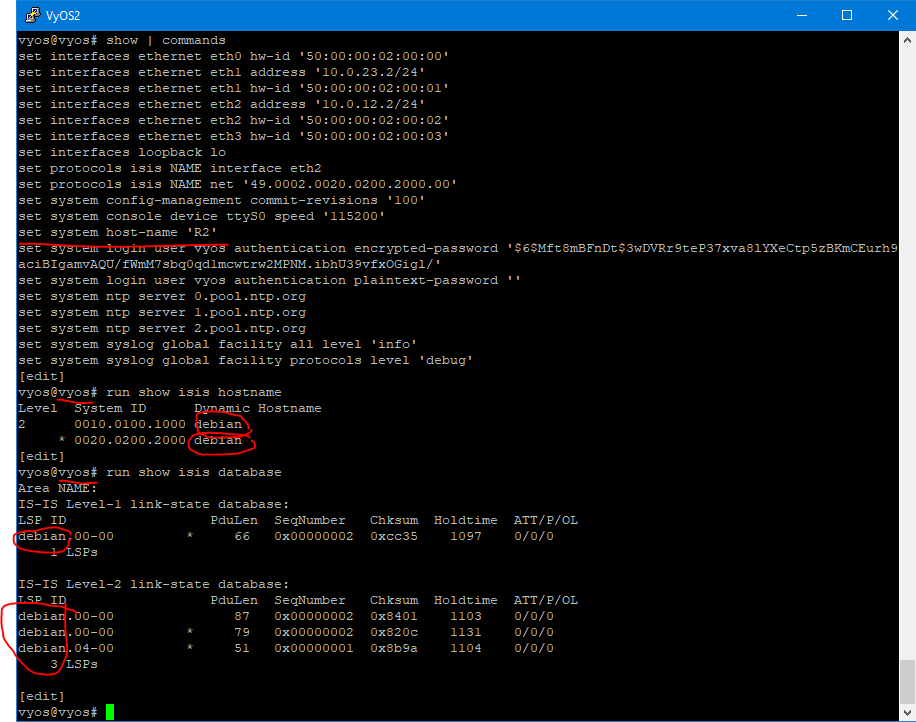
It should be the same as system hostname.
The command set protocols isis <name> dynamic-hostname the command has no effect. This is expected since the feature is enabled by default.
| craterman | |
| Jan 19 2021, 5:43 PM |
| F1118762: isis hostname.PNG | |
| Jan 19 2021, 5:43 PM |
The ISIS hostname and LSP ID displays incorrectly
A possible reason, in the FRR hostname, declares 2 times.
hostname debian
log syslog
log facility local7
hostname r5-roll
The bug with FRR described here,
ref https://github.com/FRRouting/frr/issues/7583
ref https://github.com/FRRouting/frr/issues/7522
I can say that after testing here's what I found.
Turn on ISIS and here's how it is by default:
vyos@vyos:~$ show isis hostname
Level  System ID      Dynamic Hostname
     * 0000.0000.0123 debian
Make change:
vyos@TEST3# compare
[edit system]
>host-name booooo
[edit]
vyos@TEST3# commit
[edit]
vyos@TEST3# exit
But ISIS still doesn't show it:
vyos@vyos:~$ show isis hostname
Level  System ID      Dynamic Hostname
     * 0000.0000.0123 debian
Restart FRR and:
vyos@vyos:~$ restart frr
WARNING: This is a potentially unsafe function! You may lose the connection to the router or active configuration after running this command. Use it at your own risk! Continue? [y/N]: y
vyos@vyos:~$ show isis hostname
Level  System ID      Dynamic Hostname
     * 0000.0000.0123 booooo
This seems to be a behavior of FRR. I don't know for sure but, it seems FRR only checks /etc/hostname on startup and takes that value and ONLY that value on startup. It doesn't check it on change.....so for it to work (as in the hostname to change) then FRR must be restarted.I checked it again:
vyos@booooo# set system host-name vyos
[edit]
vyos@booooo# compare
[edit system]
>host-name vyos
[edit]
vyos@booooo# commit
[edit]
vyos@booooo# exit
Warning: configuration changes have not been saved.
exit
vyos@vyos:~$ show isis hostname
Level  System ID      Dynamic Hostname
     * 0000.0000.0123 booooo
vyos@vyos:~$ restart frr
WARNING: This is a potentially unsafe function! You may lose the connection to the router or active configuration after running this command. Use it at your own risk! Continue? [y/N]: y
vyos@vyos:~$ show isis hostname
Level  System ID      Dynamic Hostname
* 0000.0000.0123 vyosDid this test again, and I got the same result.
vyos@VyOS-BB1:~$ show isis hostname
vrf     : default
Level  System ID      Dynamic Hostname
     * 1921.6825.5001 VyOS-BB1
vyos@VyOS-BB1:~$ configure
[edit]
vyos@VyOS-BB1# set system host-name boooooo
[edit]
vyos@VyOS-BB1# compare
[system]
- host-name "VyOS-BB1"
+ host-name "boooooo"

[edit]
vyos@VyOS-BB1# commit
[edit]
vyos@VyOS-BB1# exit
Warning: configuration changes have not been saved.
exit

vyos@VyOS-BB1:~$ more /etc/hostname
booooo

vyos@VyOS-BB1:~$ show isis hostname
vrf     : default
Level  System ID      Dynamic Hostname
     * 1921.6825.5001 VyOS-BB1

vyos@VyOS-BB1:~$ restart isis
WARNING: This is a potentially unsafe function!
You may lose the connection to the router or active configuration after
running this command. Use it at your own risk!

Continue? [y/N] y
% Configuration failed.

Error type: validation
Error description: YANG error(s):
 Must condition ". < 64 or /frr-isisd:isis/instance[area-tag = current()/../../area-tag]/metric-style = 'wide'" not satisfied.
 YANG path: Data location "/frr-interface:lib/interface[name='eth8']/frr-isisd:isis/metric/level-1".

The following commands were dynamically grouped into the same transaction and rejected:
-  ip router isis VyOS
-  ipv6 router isis VyOS
-  isis circuit-type level-2-only
-  isis hello-multiplier 2
-  isis metric 1000
-  isis network point-to-point
% Configuration failed.

Error type: validation
Error description: YANG error(s):
 Must condition ". < 64 or /frr-isisd:isis/instance[area-tag = current()/../../area-tag]/metric-style = 'wide'" not satisfied.
 YANG path: Data location "/frr-interface:lib/interface[name='eth9']/frr-isisd:isis/metric/level-1".

The following commands were dynamically grouped into the same transaction and rejected:
-  ip router isis VyOS
-  ipv6 router isis VyOS
-  isis circuit-type level-2-only
-  isis hello-multiplier 2
-  isis metric 1000
-  isis network point-to-point
vyos@VyOS-BB1:~$ show isis
Possible completions:
  database              Show IS-IS link state database
  hostname              Show IS-IS dynamic hostname mapping
  interface             Show IS-IS interfaces
  mpls                  Show MPLS information
  mpls-te               Show MPLS traffic engineering information
  neighbor              Show IS-IS neighbor adjacencies
  route                 Show IS-IS routing table
  segment-routing       Show IS-IS Segment-Routing (SPRING) information
  spf-delay-ietf        Show IS-IS SPF delay parameters
  summary               Show IS-IS information summary
  topology              Show IS-IS paths to Intermediate Systems
  vrf                   Show IS-IS routing protocol for given VRF


vyos@VyOS-BB1:~$ show isis hostname
vrf     : default
Level  System ID      Dynamic Hostname
     * 1921.6825.5001 boooooo
I think this is an FRR related issue. It seems that the underlying OS *does* indeed properly update. It seems that this hostname check happens only once per protocol/isisd start. Doesn't seem to be a VyOS problem. This might be one of those things that might just be a peculiarity in how isisd is coded.