Page MenuHomeVyOS Platform

IPoE service does not work on shared mode
Closed, ResolvedPublicBUG

Description

Reproducing steps

set service ipoe-server authentication interface eth1 mac-address 50:00:00:06:00:00
set service ipoe-server authentication mode 'local'
set service ipoe-server interface eth1 client-subnet '100.64.0.0/24'
set service ipoe-server interface eth1 network 'shared'
set service ipoe-server interface eth1 network-mode 'L2'
set service ipoe-server name-server '1.1.1.1'

Topology
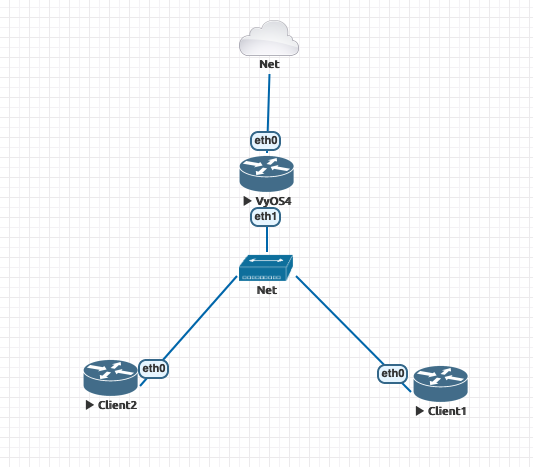
Screenshot 2020-10-14 at 11.12.59.png (467×533 px, 34 KB)

Shared mode requre proxy-arp=1 in [ipoe] section

Details

Version
1.3-rolling-202010140146
Is it a breaking change?
Unspecified (possibly destroys the router)
Issue type
Bug (incorrect behavior)

Event Timeline

Unknown Object (User) created this task.Oct 14 2020, 8:14 AM
Unknown Object (User) changed the task status from Open to Confirmed.
Unknown Object (User) claimed this task.

Could you share also Client1 and Client2 configuration? Would be nice adding this lab setup to the docs

It seems Client1 and Client2 only DHCP-clients.

Unknown Object (User) added a comment.Oct 15 2020, 12:18 PM

Yes, both clients configured as DHCP clients.
Client 1 - eth0 - 50:00:00:06:00:00
Client 2 - eth0 - 50:00:00:07:00:00

Unknown Object (User) changed the task status from Confirmed to Needs testing.Oct 16 2020, 11:29 PM
Unknown Object (User) closed this task as Resolved.Oct 22 2020, 5:55 PM
erkin renamed this task from IPoE service does not work on shared mode. to IPoE service does not work on shared mode.Aug 29 2021, 12:39 PM
erkin set Issue type to Bug (incorrect behavior).
erkin removed a subscriber: Global Notifications.