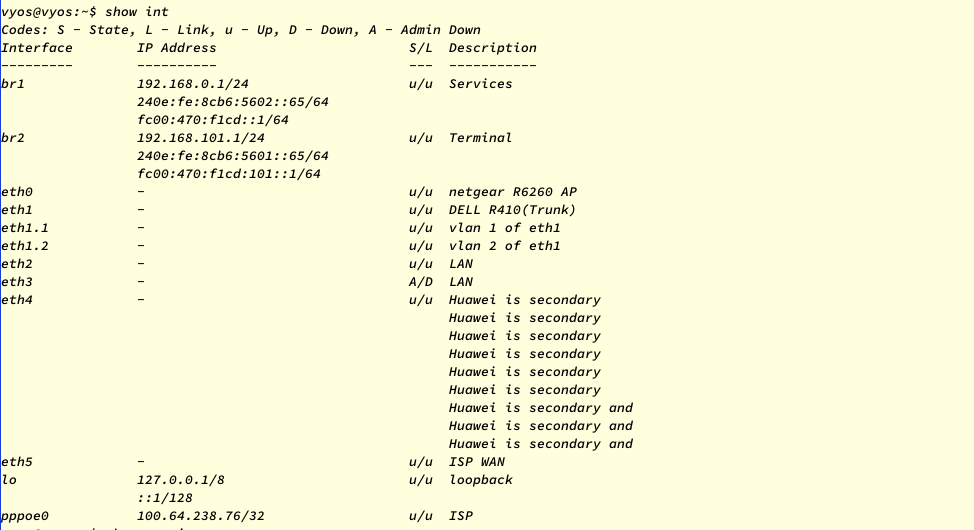
Please note that the annotation text of eth4 interface appears error display, the original text is as follows:
Huawei is secondary home router (Telecom special edition, switching and AP mode)
| jack9603301 | |
| Jun 27 2020, 11:04 AM |
| F596466: 图片.png | |
| Jun 27 2020, 11:06 AM |
Please note that the annotation text of eth4 interface appears error display, the original text is as follows:
Huawei is secondary home router (Telecom special edition, switching and AP mode)
firewall {
    all-ping enable
    broadcast-ping enable
    config-trap disable
    ipv6-receive-redirects enable
    ipv6-src-route enable
    ip-src-route enable
    log-martians enable
    name wan {
        default-action drop
        rule 1 {
            action accept
            state {
                established enable
                related enable
            }
        }
    }
    name wan-local {
        default-action drop
        rule 1 {
            action accept
            state {
                established enable
                related enable
            }
        }
        rule 2 {
            action accept
            icmp {
                type-name echo-request
            }
            protocol icmp
            state {
                new enable
            }
        }
        rule 3 {
            action drop
            destination {
                port 22
            }
            protocol tcp
            recent {
                count 4
                time 60
            }
            state {
                new enable
            }
        }
        rule 4 {
            action accept
            protocol tcp
            state {
                new enable
            }
        }
    }
    options {
        interface pppoe0 {
            adjust-mss 1452
            adjust-mss6 1452
        }
    }
    receive-redirects disable
    send-redirects enable
    source-validation disable
    state-policy {
        established {
            action accept
            log {
                enable
            }
        }
        invalid {
            action accept
            log {
                enable
            }
        }
        related {
            action accept
            log {
                enable
            }
        }
    }
    syn-cookies enable
    twa-hazards-protection disable
}
interfaces {
    bridge br1 {
        address 192.168.0.1/24
        address fc00:470:f1cd::1/64
        description Services
        member {
            interface eth1.1 {
            }
            interface eth2 {
            }
        }
        stp
    }
    bridge br2 {
        address 192.168.101.1/24
        address fc00:470:f1cd:101::1/64
        description Terminal
        member {
            interface eth0 {
            }
            interface eth1.2 {
            }
            interface eth3 {
            }
            interface eth4 {
            }
        }
        stp
    }
    ethernet eth0 {
        description "netgear R6260 AP"
        hw-id 00:98:2b:f8:3f:11
        ipv6 {
            address {
            }
            dup-addr-detect-transmits 1
        }
        mtu 1492
        offload-options {
            generic-receive on
            generic-segmentation on
            scatter-gather on
            tcp-segmentation on
            udp-fragmentation on
        }
    }
    ethernet eth1 {
        description "DELL R410(Trunk)"
        hw-id 00:98:2b:f8:3f:12
        mtu 1500
        offload-options {
            generic-receive on
            generic-segmentation on
            scatter-gather on
            tcp-segmentation on
            udp-fragmentation on
        }
        vif 1 {
            description "vlan 1 of eth1"
            mtu 1492
        }
        vif 2 {
            description "vlan 2 of eth1"
            mtu 1492
        }
    }
    ethernet eth2 {
        description LAN
        hw-id 00:98:2b:f8:3f:13
        mtu 1492
        offload-options {
            generic-receive on
            generic-segmentation on
            scatter-gather on
            tcp-segmentation on
            udp-fragmentation on
        }
    }
    ethernet eth3 {
        description LAN
        hw-id 00:98:2b:f8:3f:14
        mtu 1492
        offload-options {
            generic-receive on
            generic-segmentation on
            scatter-gather on
            tcp-segmentation on
            udp-fragmentation on
        }
    }
    ethernet eth4 {
        description "Huawei is secondary home router (Telecom special edition, switching and AP mode)"
        hw-id 00:98:2b:f8:3f:15
        mtu 1492
        offload-options {
            generic-receive on
            generic-segmentation on
            scatter-gather on
            tcp-segmentation on
            udp-fragmentation on
        }
    }
    ethernet eth5 {
        description "ISP WAN"
        disable-flow-control
        firewall {
            in {
                name wan
            }
            local {
                name wan-local
            }
        }
        hw-id 00:98:2b:f8:3f:16
        mtu 1500
        offload-options {
            generic-receive on
            generic-segmentation on
            scatter-gather on
            tcp-segmentation on
            udp-fragmentation on
        }
    }
    loopback lo {
        address 127.0.0.1/8
        address ::1/128
        description loopback
    }
    pppoe pppoe0 {
        authentication {
            password pass
            user user
        }
        default-route force
        description ISP
        dhcpv6-options {
            prefix-delegation {
                interface br1 {
                    address 101
                    sla-id 2
                    sla-len 8
                }
                interface br2 {
                    address 101
                    sla-id 1
                    sla-len 8
                }
            }
        }
        idle-timeout 30
        ipv6 {
            address {
                autoconf
            }
            enable
        }
        mtu 1492
        source-interface eth5
    }
}
nat {
    nptv6 {
        rule 2 {
            outbound-interface pppoe0
            source {
                prefix fc00:470:f1cd::/64
            }
            translation {
                prefix 240e:fc:7d:b79b::/64
            }
        }
    }
    source {
        rule 1 {
            description PUBLIC
            log
            outbound-interface pppoe0
            protocol all
            source {
                address 0.0.0.0/0
            }
            translation {
                address masquerade
            }
        }
    }
}
protocols {
    static {
        interface-route 0.0.0.0/0 {
            next-hop-interface pppoe0 {
            }
        }
        interface-route6 ::/0 {
            next-hop-interface pppoe0 {
            }
        }
        table 150 {
            interface-route 0.0.0.0/0 {
                next-hop-interface pppoe0 {
                }
            }
            interface-route6 ::/0 {
                next-hop-interface pppoe0 {
                }
            }
        }
    }
}
service {
    dhcp-server {
        shared-network-name pri101 {
            description "DHCP 101"
            subnet 192.168.101.0/24 {
                default-router 192.168.101.1
                dns-server 192.168.0.254
                dns-server 192.168.101.1
                dns-server 192.168.0.1
                lease 86400
                ntp-server 192.168.101.1
                range 0 {
                    start 192.168.101.9
                    stop 192.168.101.254
                }
            }
        }
    }
    dns {
        forwarding {
            allow-from 192.168.0.0/16
            allow-from 2001:470:f1cd::/48
            cache-size 1024
            domain pve. {
                addnta
                recursion-desired
                server 192.168.0.47
                server 2001:470:f1cd::47
            }
            listen-address 0.0.0.0
            listen-address ::
            name-server 2001:470:f1cd::ff00
            name-server 192.168.0.254
            name-server 202.96.134.33
            name-server 202.96.128.86
            name-server 114.114.114.114
            name-server 1.1.1.1
            name-server 1.0.0.1
            system
        }
    }
    https {
        api {
            debug
            keys {
                id admin {
                    key jack960330
                }
            }
            port 8000
        }
        api-restrict {
            virtual-host vhost0
        }
        certificates {
            system-generated-certificate {
                lifetime 365
            }
        }
        virtual-host vhost0 {
            listen-address "*"
            server-name 192.168.0.1
        }
    }
    mdns {
        repeater {
            interface br1
            interface br2
        }
    }
    router-advert {
        interface br1 {
            default-preference high
            interval {
                max 600
                min 10
            }
            name-server fc00:470:f1cd::ff00
            prefix ::/64 {
            }
            reachable-time 0
            retrans-timer 0
        }
        interface br2 {
            default-preference high
            hop-limit 60
            interval {
                max 600
                min 10
            }
            name-server fc00:470:f1cd::ff00
            prefix ::/64 {
            }
            reachable-time 0
            retrans-timer 0
        }
    }
    ssh {
        listen-address 0.0.0.0
        listen-address ::
    }
}
system {
    config-management {
        commit-revisions 100
    }
    console {
        device ttyS0 {
            speed 115200
        }
    }
    domain-name router
    host-name vyos
    ip {
        arp {
            table-size 2048
        }
        multipath {
            layer4-hashing
        }
    }
    ipv6 {
        multipath {
            layer4-hashing
        }
        neighbor {
            table-size 2048
        }
        strict-dad
    }
    login {
        user vyos {
            authentication {
                encrypted-password $6$UaXQViDvJ.Hr$85U/9Q5d/tc9hdtrnntMVgrztOCext..OJCHaJYZUo82GAdD95lchvSjI3vCZJTNte7cIAs87YctYlXODGXAz1
                plaintext-password ""
            }
        }
    }
    ntp {
        allow-clients {
            address 192.168.0.0/16
            address fc00:470:f1cd::/48
        }
        listen-address ::
        listen-address 0.0.0.0
        server 0.debian.pool.ntp.org {
        }
        server 1.debian.pool.ntp.org {
        }
        server 2.debian.pool.ntp.org {
        }
        server 3.debian.pool.ntp.org {
        }
    }
    options {
        reboot-on-panic
    }
    sysctl {
        custom net.ipv4.conf.all.rp_filter {
            value 0
        }
        custom net.ipv4.conf.default.rp_filter {
            value 0
        }
        custom net.ipv4.conf.eth0.rp_filter {
            value 0
        }
        custom net.ipv6.conf.all.accept_ra {
            value 2
        }
        custom net.ipv6.conf.all.forwarding {
            value 1
        }
    }
    syslog {
        global {
            facility all {
                level info
            }
            facility protocols {
                level debug
            }
        }
    }
    time-zone Asia/Shanghai
}This is issue is reproduced in the VyOS 1.3-rolling-202007140117 version. The interface description is showing up-to 23 characters in the "show interface output" only.
It shows correctly in the command output of 'sudo ip l" Tested for different interface types.
Outputs from the lab testing:
Existing Configuration:
set interfaces bridge br0 description 'This is for testing purpose only'
set interfaces ethernet eth0 address '192.168.255.100/24'
set interfaces ethernet eth0 description 'WLAN'
set interfaces ethernet eth0 hw-id '50:0c:00:01:00:00'
set interfaces ethernet eth1 description 'Huawei is secondary home'
set interfaces ethernet eth1 hw-id '50:0c:00:01:00:01'
set interfaces ethernet eth2 hw-id '50:0c:00:01:00:02'
set interfaces ethernet eth3 hw-id '50:0c:00:01:00:03'
set interfaces loopback lo
set interfaces pseudo-ethernet peth0 address '10.0.0.1/24'
set interfaces pseudo-ethernet peth0 description 'Sample virtual Ethernet interface'
set interfaces pseudo-ethernet peth0 mode 'passthru'
set interfaces pseudo-ethernet peth0 source-interface 'eth0'
Output of "Show interface" command
vyos@vyos:~$ show int
Codes: S - State, L - Link, u - Up, D - Down, A - Admin Down
Interface IP Address S/L Description
br0 - A/D This is for testing
This is for testing
This is for testing
eth0 192.168.255.100/24 u/u WLAN
eth1 - u/u Huawei is secondary
Huawei is secondary
eth2 - u/u
eth3 - u/u
lo 127.0.0.1/8 u/u
::1/128
peth0 10.0.0.1/24 u/u Sample virtual Ethernet
Sample virtual Ethernet
Output of "sudo ip l"
2: eth0: <BROADCAST,MULTICAST,UP,LOWER_UP> mtu 1500 qdisc pfifo_fast state UP mode DEFAULT group default qlen 1000
link/ether 50:0c:00:01:00:00 brd ff:ff:ff:ff:ff:ff
alias WLAN
3: eth1: <BROADCAST,MULTICAST,UP,LOWER_UP> mtu 1500 qdisc pfifo_fast state UP mode DEFAULT group default qlen 1000
link/ether 50:0c:00:01:00:01 brd ff:ff:ff:ff:ff:ff
alias Huawei is secondary home
4: eth2: <BROADCAST,MULTICAST,UP,LOWER_UP> mtu 1500 qdisc pfifo_fast state UP mode DEFAULT group default qlen 1000
link/ether 50:0c:00:01:00:02 brd ff:ff:ff:ff:ff:ff
5: eth3: <BROADCAST,MULTICAST,UP,LOWER_UP> mtu 1500 qdisc pfifo_fast state UP mode DEFAULT group default qlen 1000
link/ether 50:0c:00:01:00:03 brd ff:ff:ff:ff:ff:ff
6: br0: <NO-CARRIER,BROADCAST,MULTICAST,UP> mtu 1500 qdisc noqueue state DOWN mode DEFAULT group default qlen 1000
link/ether 6a:b6:dd:4f:15:61 brd ff:ff:ff:ff:ff:ff
alias This is for testing purpose only
7: peth0@eth0: <BROADCAST,MULTICAST,UP,LOWER_UP> mtu 1500 qdisc noqueue state UP mode DEFAULT group default qlen 1000
link/ether 50:0c:00:01:00:00 brd ff:ff:ff:ff:ff:ff
alias Sample virtual Ethernet interface
Tested in VyOS 1.2.5 version, where the results show as expected.
Output of "show interfaces" command:
Codes: S - State, L - Link, u - Up, D - Down, A - Admin Down
Interface IP Address S/L Description
eth0 192.168.0.1/24 u/u This is for testing
purpose only
eth1 - u/u
eth2 - u/u
eth3 - u/u
lo 127.0.0.1/8 u/u
::1/128
peth0 10.0.0.1/24 u/u Sample virtual Ethernet
interface
@SrividyaA the task is assigned to you, if you are going to fix it, all good, otherwise happy to do so.
PR https://github.com/vyos/vyos-1x/pull/512
vyos@r-roll:~$ /usr/libexec/vyos/op_mode/show_interfaces.py --action=show-brief
Codes: S - State, L - Link, u - Up, D - Down, A - Admin Down
Interface        IP Address                        S/L  Description
---------        ----------                        ---  -----------
dum0             10.0.0.1/24                       u/u  Huawei is secondary home router Telecom special edition switching and AP mode
Fixed in the latest rolling release
vyos@r1-roll:~$ show int
Codes: S - State, L - Link, u - Up, D - Down, A - Admin Down
Interface        IP Address                        S/L  Description
---------        ----------                        ---  -----------
eth0             192.168.122.11/24                 u/u  Huawei is secondary home router Telecom special edition switching and AP mode
lo               127.0.0.1/8                       u/u
                 ::1/128
vyos@r1-roll:~$ show version

Version:          VyOS 1.3-rolling-202007220117