This bug must be fixed in current rolling, because of T1416. @dongjunbo, check this, please.
Feed Search
Jun 5 2019
Jun 5 2019
zsdc changed the status of T1350: VRRP transition script will be executed once only from Open to Confirmed.
Jun 4 2019
Jun 4 2019
zsdc added a comment to T1376: Incorrect DHCP lease counting.
May 30 2019
May 30 2019
zsdc added a comment to T1416: 2 dhcp server run in failover mode can't sync hostname with each other.
Problems with DHCP server status viewing can be fixed with the next patch for show_dhcp.py :
--- orig/show_dhcp.py	2019-05-30 22:45:01.625708032 +0300
+++ T1416/show_dhcp.py	2019-05-30 22:40:33.302777881 +0300
@@ -55,15 +55,28 @@
     return data
May 22 2019
May 22 2019
zsdc changed the status of T1395: Improve boot time for instances with a big count of DHCP servers from Open to In progress.
May 16 2019
May 16 2019
The solution was tested and fully worked.
@hagbard, everything works fine now. Thank you!
May 15 2019
May 15 2019
zsdc added a comment to T1379: Deprecated functions in /sbin/dhclient-script.
@hagbard @UnicronNL, please make a new one PR. This is correct patch:
diff -Naur origin/dhclient-script pull2/dhclient-script
--- origin/dhclient-script	2019-05-15 19:32:59.001598203 +0300
+++ pull2/dhclient-script	2019-05-15 19:33:47.533181873 +0300
@@ -39,7 +39,6 @@
         echo " " > $new_resolv_conf
     fi
May 14 2019
May 14 2019
zsdc added a comment to T1267: FRR: Add interface name for static routes.
This is not the same.
set protocols static table 100 interface-route 10.100.100.0/24 next-hop-interface eth1
generate:
test-06# show running-config staticd
Building configuration...
zsdc renamed T1379: Deprecated functions in /sbin/dhclient-script from Deprecated function in /sbin/dhclient-script to Deprecated functions in /sbin/dhclient-script.
zsdc changed the status of T1379: Deprecated functions in /sbin/dhclient-script from Open to Confirmed.
May 13 2019
May 13 2019
@hagbard solution works. Please, add it also to the stable branch and to the set protocols static table section.
May 3 2019
May 3 2019
Apr 18 2019
Apr 18 2019
zsdc added a comment to T1325: GRE tunnel to Cisco router fails in 1.2.0 - works in 1.1.8.
Unfortunately, current Linux GRE and network stack implementations don't support Cisco-style of GRE keepalives (GRE inside GRE, with spoofed IP addresses). From the Linux point of view, those packets look like martians, and the kernel drop them, information about what you can see inside a log.
Try to disable the keepalive at the Cisco side, after this tunnel must be fully functional.
Apr 5 2019
Apr 5 2019
zsdc reopened T1322: Wrong configuration generated for DHCPv6 Relay as "Confirmed".
Sorry, I must reopen this task. Absolutely the same situation with multiple "lower" interfaces:
OPTIONS="-6 -l ::%eth1.100-l ::%eth1.102 -u 2001:db8:0:feed::2%eth2.88 -u 2001:db8:0:feed::3%eth2.88 "
                         ^^
                         here
Apr 3 2019
Apr 3 2019
Mar 21 2019
Mar 21 2019
Mar 21 2019, 5:22 PM · VyOS 1.3 Equuleus (1.3.9), VyOS 1.4 Sagitta (1.4.0-epa1), Restricted Project, test
Mar 12 2019
Mar 12 2019
zsdc updated the task description for T1297: Add GARP settings to VRRP/keepalived.
Mar 6 2019
Mar 6 2019
zsdc added a comment to T927: IPv6 GRE packets not being forwarded.
Thank you! This was made the situation much more apparent. Provide, please, an output of the next command:
sudo ipset list
Mar 4 2019
Mar 4 2019
Feb 28 2019
Feb 28 2019
Feb 27 2019
Feb 27 2019
zsdc added a comment to T927: IPv6 GRE packets not being forwarded.
Can you disable this GRE tunnel and make a dump of a moment when a tunnel being established?
Also, send output of:
sudo ip6tables -t raw -L -n -v
sudo ip6tables -t filter -L -n -v
sudo ip6tables -t mangle -L -n -v
sudo ip6tables -t nat -L -n -v
zsdc added a comment to T1267: FRR: Add interface name for static routes.
Unfortunately, this works only for default route, but not for any other.
Feb 26 2019
Feb 26 2019
zsdc added a comment to T927: IPv6 GRE packets not being forwarded.
@jjcordon can you provide the full configuration and test again with a latest rolling version?
In our test with 1.2.0-rolling+201902250337 everything works fine:
routing table:
C>* 2001:XXXX:YYYY:11::/64 is directly connected, eth1, 00:27:06
C>* 2001:XXXX:YYYY:12::/64 is directly connected, eth2, 00:14:28
According to pmacct configuration, this looks good. We need to check code, and if all is correct I propose to merge this into rolling for testing.
Just the one nuance. Currently, VyOS CLI doesn't allow to set a BGP neighbor to the local IP address. If we accept this patch, then it will be good to remove this restriction.
zsdc closed T485: iBGP recursive route via OSPF-learned loopback next-hop selects (wrong) interface next-hop as Invalid.
I'm closing this ticket, because we don't have feedback from author for a long time nor configuration for reproducing this by ourselves.
If someone will meet with this bug with FRRouting-based versions of VyOS, please reopen.
zsdc changed the status of T681: Shaper QoS policy does not recognize 'lowdelay' DSCP value from Needs testing to Confirmed.
Hello!
Bug confirmed in 1.2.0-rolling+201902250337. Current way of checking values accept only that names, which is returned by cat /etc/iproute2/rt_dsfield (source). Currently with kernel 4.19.20-amd64-vyos this is:
# Differentiated field values
# These include the DSCP and unused bits
0x0	default
# Newer RFC2597 values
0x28	AF11
0x30	AF12
0x38	AF13
0x48	AF21
0x50	AF22
0x58	AF23
0x68	AF31
0x70	AF32
0x78	AF33
0x88	AF41
0x90	AF42
0x98	AF43
# Older values RFC2474
0x20	CS1
0x40	CS2
0x60	CS3
0x80	CS4
0xA0	CS5
0xC0	CS6
0xE0	CS7
# RFC 2598
0xB8	EF
Feb 25 2019
Feb 25 2019
zsdc changed the status of T577: Unconfigured Ethernet interface discovery partial failure on boot from Needs testing to Confirmed.
Confirmed in 1.2.0-rolling+201902250337. A hw-id is assigned to only one of interfaces per boot.
If this will not lead to a race condition situation, maybe try to implement the solution from T577#12637 proposed by @rps?
Confirmed in 1.2.0-rolling+201902250337.
I think we must allow adding overlapped networks/address into the same set, as ipset allows to do this. Maybe situations, where this will be necessary, are rare (for example, resizing network size defined in set), but there is no clear reason to deny such combinations.
Feb 14 2019
Feb 14 2019
zsdc added a comment to T258: Can not configure wan load-balancing on vyos-1.2.
With new package all works fine.
Feb 13 2019
Feb 13 2019
zsdc added a comment to T258: Can not configure wan load-balancing on vyos-1.2.
Need to reopen this task.
Version: 1.2.0-LTS.
Running configuration:
vyos@test-01# show
 interfaces {
     ethernet eth0 {
         address 192.168.55.18/30
         duplex auto
         hw-id 08:00:27:95:bb:f6
         smp-affinity auto
         speed auto
     }
     ethernet eth1 {
         address 192.168.56.3/24
         duplex auto
         hw-id 08:00:27:8e:d6:fb
         smp-affinity auto
         speed auto
     }
     ethernet eth2 {
         duplex auto
         hw-id 08:00:27:8c:27:04
         smp-affinity auto
         speed auto
     }
     loopback lo {
     }
 }
 service {
     ssh {
     }
 }
 system {
     config-management {
         commit-revisions 100
     }
     console {
         device ttyS0 {
             speed 9600
         }
     }
     host-name test-01
     login {
         user vyos {
             authentication {
                 encrypted-password $6$7X4XbQJ2xVMZ8$NmISPmyC1f88cIfcKig01pkjePNTVeeWwULrHgich6wB0A1TH/b31Jywpsde8Mv4/B8Qa5CxFM.rlXmfOQT0Z0
                 plaintext-password ""
             }
             level admin
         }
     }
     name-server 1.1.1.1
     ntp {
         server 0.pool.ntp.org {
         }
         server 1.pool.ntp.org {
         }
         server 2.pool.ntp.org {
         }
     }
     syslog {
         global {
             facility all {
                 level info
             }
             facility protocols {
                 level debug
             }
         }
     }
     time-zone UTC
 }
Feb 12 2019
Feb 12 2019
Feb 8 2019
Feb 8 2019
This bug can't be reproduced in 1.2.0-LTS and 1.2.0-rolling+201902080337, so seems that it was fixed in some of previous releases. Closing ticket.
Feel free to reopen it if the the same behavior will be spotted in one of current releases.
zsdc added a comment to T1148: epa2 BGP peers initiate before config is fully loaded, routes leak..
@danhusan , you can send the configuration to support@vyos.io with the theme "Phabricator T1148". Also, please check if a remote side of BGP peering run in active or passive mode?
Feb 7 2019
Feb 7 2019
zsdc added a comment to T1148: epa2 BGP peers initiate before config is fully loaded, routes leak..
Hello @danhusan!
How big is your configuration at all? Can you provide depersonalized config? Which hardware or virtual machine using for VyOS? Can you provide full log of booting?
We can't confidently reproduce this bug. Looks like configuration can't load quickly enough or something like this.
Bug confirmed. The problem is in FRRouting CLI (FRRouting 7.1-dev).
Will see what we can do with this.
zsdc changed the status of T1209: OSPF max-metric values over 100 cause commit errors from In progress to Confirmed.
Hello, @adestis!
You can use values from 5 to 100. 600 is unsupported in current FRRouting.
zsdc added a comment to T1158: Route-Map configuration dropped updating rc11 to epa2.
Hello, @MrXermon!
We can't reproduce this bug. Maybe, there are some other errors, which can affect route-maps?
If you have the old configuration, can you check update procedure with an update to 1.2.0-LTS and current rolling?
zsdc added a comment to T1140: Policy Route Not Work.
Hello, @rizkidtn!
Is any problems still exist with your configuration or we can close this issue?
zsdc added a comment to T1094: vyos 1.2 rc 10 stuck on "Started bpfilter" when rebooting.
Hello, @dongjunbo!
Can you check behavior with new versions? If the problem still exist show us an example of such big configuration, or at least count of objects and their types in this config.
zsdc added a comment to T1187: Command show log vpn display wrong information .
Hello, @bjtangseng!
Can you recheck this with fresh versions? Seems that in 1.2.0-LTS and rolling everything is OK. Also, if there is no VPN logs at all (for example, VPN is not configured), you can see output like in first message and then this will be not a issue.
zsdc added a comment to T1044: Dead loop on virtual device.
Hello, @TrueTechy!
As I understand, this situation can exist only if interface is in down state? Can you check this behavior with fresh VyOS version?
Jan 21 2019
Jan 21 2019
zsdc added a comment to T1157: Static route not reachable through VRRP address.
OK, things is more clearly now.
If you don't have any L2-filters between eth1 interfaces of VyOS instances I could recommend you first to change configuration to something like this (based on your configuration from first message):
Router 1:
Jan 15 2019
Jan 15 2019
zsdc changed the status of T1172: vyatta_update_sysctl.pl does not support options that have multiple values from Needs testing to Confirmed.
Confirmed. If we try to change variable with multiple values, will be applied only first of them. For example:
net.ipv4.tcp_wmem = 4098 16384 1643392
zsdc added a comment to T1157: Static route not reachable through VRRP address.
Hi, @bmtauer!
To be honest, it's looks like you have used bug or some non-typical behavior in 1.1.8 as feature. Your configuration looks strange from the start, so I propose to start investigation of this from detailed description of your task, which you want to solve by this all.
If you can, please, provide information about:
- Connections at eth interfaces on both (master and backup) routers. As I understand, all interfaces is connected to the same L2 segment of network? Explain why connections was made like this - this is not obvious for us now.
- What exactly you want to reach by VRRP? Just make reserved router or this is part of more complex task?
The more we understand your task, the faster we will can help to solve this problem.
Jan 8 2019
Jan 8 2019
zsdc added a comment to T1135: "firewall send-redirects enable" works only after switching from disabled state on running system.
I doubt that it will be unecrypted
It can be at 100% unencrypted. If sender accept redirects, then traffic can be routed through another router. :)
zsdc added a comment to T1135: "firewall send-redirects enable" works only after switching from disabled state on running system.
By default, more optimal will be leaving send_redirects in enabled state.
I think, that better will be preventing to commit something in vpn ipsec if send_redirects is enabled for any interface, as we can't predict at 100% from which interface will be received traffic, that need to be encrypted with IPSec.
Per-interface option can help in any case, definitely. But we need to leave at least warning to user, where will be clearly said, that with enabled send_redirects some of traffic from interface with this option can be leaked through unencrypted channels.
zsdc added a comment to T1137: 'sh ip bgp sum' being truncated.
Can you reproduce this with some other emulator, except SecureCRT and make video with this bug?
Jan 7 2019
Jan 7 2019
zsdc changed the status of T1141: Conntrack helpers are no longer active by default from Needs testing to Confirmed.
OK. So, for now, anyone can use workarounds provided in T1011 or here. And wait for permanent fix in further builds.
zsdc added a comment to T1137: 'sh ip bgp sum' being truncated.
Hi, @knozzle !
Provide, please, output of next command, executed in the same terminal as defected show ip bgp summary:
tput cols ; tput lines
zsdc added a comment to T1140: Policy Route Not Work.
Hi, @rizkidtn!
Policy route wouldn't work if it will be assigned to any other interface, except those from which incoming traffic will be received.
Why do you can't set policy to eth1.2400 interface? Is there some problems or errors related with this occurs?
Dec 30 2018
Dec 30 2018
zsdc added a comment to T1141: Conntrack helpers are no longer active by default.
I can confirm, that problem with connection tracking is exist. Reason in this change in Linux kernel. Now, by default, all connection helpers is disabled. You may try to search in your log files something like:
kernel: nf_conntrack: default automatic helper assignment has been turned off for security reasons and CT-based firewall rule not found. Use the iptables CT target to attach helpers instead.
If you want, you may read more about this here.
So, we need to add all helpers by hand. You may try next workaround. Add this to /config/scripts/vyatta-postconfig-bootup.script:
sleep 10
iptables -t raw -I VYATTA_CT_HELPER 1 -p tcp --dport 1723 -j CT --helper pptp
iptables -t raw -I VYATTA_CT_HELPER 2 -p tcp --dport 21 -j CT --helper ftp
Then reboot or, if you want tot apply it without rebooting, just execute all commands in root shell.
Dec 28 2018
Dec 28 2018
zsdc added a comment to T1135: "firewall send-redirects enable" works only after switching from disabled state on running system.
I've made some tests...
I have build a lab with next configuration:
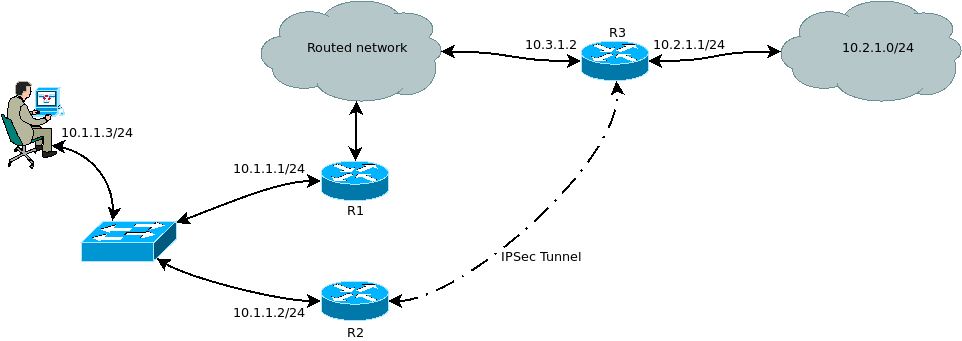
In test PC gateway to 10.2.1.0/24 is R2.
In R2 we have next routing tables:
vyos@vyos:~$ show ip route
Codes: K - kernel route, C - connected, S - static, R - RIP,
       O - OSPF, I - IS-IS, B - BGP, E - EIGRP, N - NHRP,
       T - Table, v - VNC, V - VNC-Direct, A - Babel, D - SHARP,
       F - PBR, f - OpenFabric,
       > - selected route, * - FIB route
Dec 27 2018
Dec 27 2018
zsdc added a comment to T1135: "firewall send-redirects enable" works only after switching from disabled state on running system.
I found. This is VPN settings.
Based on information from Linux IP stack flow diagrams, IPSec policy applying after route decision, and ICMP redirects doing before this. So we can't leave send_redirects=1 on interface, where we receive unencrypted traffic for IPSec.
But, we can:
- Check for firewall send-redirects 'enable' and prevent to commiting vpn ipsec options, when send_redirects is enabled.
- Disable send_redirects only on interfaces, where we expect incoming unencrypted IPSec traffic.
I'm not sure, what is better.
Dec 25 2018
Dec 25 2018
zsdc added a comment to T1135: "firewall send-redirects enable" works only after switching from disabled state on running system.
If you just enable and reboot it works too? I've seen this problem at different routers with RC3, RC11 and rolling, but I can't find obvious reason for it.
Dec 24 2018
Dec 24 2018
zsdc added a comment to T1135: "firewall send-redirects enable" works only after switching from disabled state on running system.
Hi @hagbard!
Config in attachment.
Dec 18 2018
Dec 18 2018
Dec 17 2018
Dec 17 2018
zsdc updated the task description for T1111: Misbehaviour of "recent" options in firewall rules.
Dec 14 2018
Dec 14 2018
zsdc added a comment to T1102: Disabling rp_filter don't work.
Here what I mean.
Before enabling rp_filter:
net.ipv4.conf.all.rp_filter = 0
net.ipv4.conf.default.rp_filter = 0
net.ipv4.conf.eth0.rp_filter = 0
net.ipv4.conf.eth1.rp_filter = 0
net.ipv4.conf.eth2.rp_filter = 0
net.ipv4.conf.l2tpeth1.rp_filter = 0
net.ipv4.conf.lo.rp_filter = 0
After enabling:
net.ipv4.conf.all.rp_filter = 2
net.ipv4.conf.default.rp_filter = 2
net.ipv4.conf.eth0.rp_filter = 2
net.ipv4.conf.eth1.rp_filter = 2
net.ipv4.conf.eth2.rp_filter = 2
net.ipv4.conf.l2tpeth1.rp_filter = 2
net.ipv4.conf.lo.rp_filter = 2
After disabling:
net.ipv4.conf.all.rp_filter = 0
net.ipv4.conf.default.rp_filter = 2
net.ipv4.conf.eth0.rp_filter = 2
net.ipv4.conf.eth1.rp_filter = 2
net.ipv4.conf.eth2.rp_filter = 2
net.ipv4.conf.l2tpeth1.rp_filter = 2
net.ipv4.conf.lo.rp_filter = 2
Dec 13 2018
Dec 13 2018
zsdc updated the task description for T1102: Disabling rp_filter don't work.
Dec 5 2018
Dec 5 2018
Dec 4 2018
Dec 4 2018
zsdc added a comment to T1000: Broken 6rd tunnel implementation.
Tested with 1.2.0-rolling+201812010337. Still many bugs, very hard to diagnostic it properly.
Minimal list TODO, for we can continue testing:
zsdc added a comment to T1025: Command "show routing table XX" don't work (FRRouting bug).
Checked in 1.2.0-rolling+201812010337, all works fine.
Vtysh:
root@vyos:/home/vyos# vtysh
Dec 3 2018
Dec 3 2018
Nov 26 2018
Nov 26 2018
Nov 20 2018
Nov 20 2018
zsdc added a comment to T1000: Broken 6rd tunnel implementation.
I will check fix soon.
By creating tunnels without remote side I mean something like:
ip tunnel add sit1 mode sit local 192.168.20.20 ttl 64
This is "vanilla way", as I understand.
Nov 18 2018
Nov 18 2018
Nov 15 2018
Nov 15 2018
Nov 11 2018
Nov 11 2018
Oct 28 2018
Oct 28 2018
zsdc added a comment to T945: Unable to change configuration after changing it from script (vbash + script-template).
@dmbaturin after some thinking about this problem I think that doing sg for all script is not a very good idea. There can be a situations, when we wan't to run it from other groups.
By now, I see two ways:
- add additional parameter to executable option, that will define using script vbash with template or not;
- move setting up right group to /opt/vyatta/etc/functions/script-template.
Second way seems more practical and easy for configuration migrations.
zsdc added a comment to T945: Unable to change configuration after changing it from script (vbash + script-template).
@syncer, thanks for hint. Works with:
[edit]
vyos@vyos# show system task-scheduler
 task testtask01 {
     crontab-spec @reboot
     executable {
         arguments "vyattacfg /config/scripts/testscript01.script"
         path /usr/bin/sg
     }
 }
[edit]
vyos@vyos#
But this workaround is ugly a little bit (if we want to use arguments for example).
Maybe, better will be if VyOS will do this under the hood, without end-user engagement?