Hi team
In EVPN-MH, Designated Forwarder (DF) functionality is responsible for blocking traffic on the non-DF spine when operating in active/active mode. Currently, this behavior is not working as expected. The system forwards BUM traffic without applying any split-horizon filtering.
example :
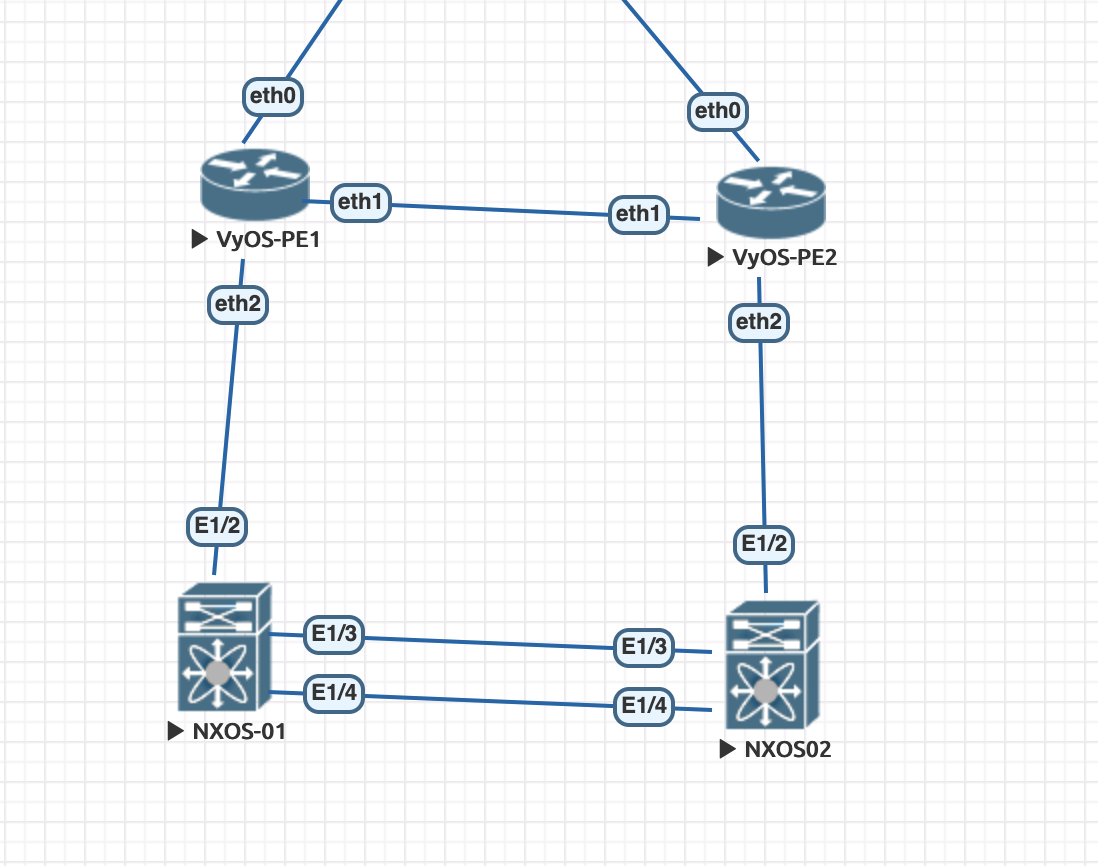
vyos-configuration :
vyos@VyOS-PE01:~$ show configuration commands
set interfaces bonding bond0 evpn es-df-pref '1000'
set interfaces bonding bond0 evpn es-id '100'
set interfaces bonding bond0 evpn es-sys-mac 'aa:bb:cc:dd:ee:f0'
set interfaces bonding bond0 lacp-rate 'fast'
set interfaces bonding bond0 member interface 'eth2'
set interfaces bonding bond0 mode '802.3ad'
set interfaces bonding bond0 system-mac 'aa:bb:cc:dd:ee:f0'
set interfaces bridge br0 address '10.0.0.2/24'
set interfaces bridge br0 ip enable-arp-ignore
set interfaces bridge br0 member interface bond0
set interfaces bridge br0 member interface dum100
set interfaces bridge br0 member interface vxlan0
set interfaces dummy dum100 mac 'aa:bb:cc:dd:ee:f0'
set interfaces ethernet eth0 address 'dhcp'
set interfaces ethernet eth0 dhcp-options default-route-distance '150'
set interfaces ethernet eth0 hw-id '50:00:00:01:00:00'
set interfaces ethernet eth0 offload gro
set interfaces ethernet eth0 offload gso
set interfaces ethernet eth0 offload sg
set interfaces ethernet eth0 offload tso
set interfaces ethernet eth1 address '10.1.2.1/24'
set interfaces ethernet eth1 hw-id '50:00:00:01:00:01'
set interfaces ethernet eth1 offload gro
set interfaces ethernet eth1 offload gso
set interfaces ethernet eth1 offload sg
set interfaces ethernet eth1 offload tso
set interfaces ethernet eth2 hw-id '50:00:00:01:00:02'
set interfaces ethernet eth2 offload gro
set interfaces ethernet eth2 offload gso
set interfaces ethernet eth2 offload sg
set interfaces ethernet eth2 offload tso
set interfaces ethernet eth3 hw-id '50:00:00:01:00:03'
set interfaces ethernet eth3 offload gro
set interfaces ethernet eth3 offload gso
set interfaces ethernet eth3 offload sg
set interfaces ethernet eth3 offload tso
set interfaces loopback lo
set interfaces pseudo-ethernet peth0 address '10.0.0.1/32'
set interfaces pseudo-ethernet peth0 ip disable-arp-filter
set interfaces pseudo-ethernet peth0 mac 'aa:bb:cc:dd:ee:f0'
set interfaces pseudo-ethernet peth0 source-interface 'br0'
set interfaces vxlan vxlan0 parameters neighbor-suppress
set interfaces vxlan vxlan0 port '4789'
set interfaces vxlan vxlan0 source-address '10.1.2.1'
set interfaces vxlan vxlan0 vni '100'
set nat source rule 10 outbound-interface name 'eth0'
set nat source rule 10 translation address 'masquerade'
set protocols bgp address-family l2vpn-evpn advertise-all-vni
set protocols bgp neighbor 10.1.2.2 peer-group 'ESI_PEERS'
set protocols bgp peer-group ESI_PEERS address-family ipv4-unicast default-originate
set protocols bgp peer-group ESI_PEERS address-family ipv4-unicast nexthop-self
set protocols bgp peer-group ESI_PEERS address-family l2vpn-evpn
set protocols bgp peer-group ESI_PEERS remote-as '65000'
set protocols bgp system-as '65000'
set protocols bgp timers holdtime '30'
set protocols bgp timers keepalive '10'

set system config-management commit-revisions '100'
set system console device ttyS0 speed '115200'
set system host-name 'VyOS-PE01'
set system login operator-group default command-poli
PE2
set interfaces bonding bond0 evpn es-df-pref '900'
set interfaces bonding bond0 evpn es-id '100'
set interfaces bonding bond0 evpn es-sys-mac 'aa:bb:cc:dd:ee:f0'
set interfaces bonding bond0 lacp-rate 'fast'
set interfaces bonding bond0 member interface 'eth2'
set interfaces bonding bond0 mode '802.3ad'
set interfaces bonding bond0 system-mac 'aa:bb:cc:dd:ee:f0'
set interfaces bridge br0 address '10.0.0.3/24'
set interfaces bridge br0 ip enable-arp-ignore
set interfaces bridge br0 member interface bond0
set interfaces bridge br0 member interface dum100
set interfaces bridge br0 member interface vxlan0
set interfaces dummy dum100 mac 'aa:bb:cc:dd:ee:f0'
set interfaces ethernet eth0 address 'dhcp'
set interfaces ethernet eth0 dhcp-options default-route-distance '150'
set interfaces ethernet eth0 hw-id '50:00:00:02:00:00'
set interfaces ethernet eth0 offload gro
set interfaces ethernet eth0 offload gso
set interfaces ethernet eth0 offload sg
set interfaces ethernet eth0 offload tso
set interfaces ethernet eth1 address '10.1.2.2/24'
set interfaces ethernet eth1 hw-id '50:00:00:02:00:01'
set interfaces ethernet eth1 offload gro
set interfaces ethernet eth1 offload gso
set interfaces ethernet eth1 offload sg
set interfaces ethernet eth1 offload tso
set interfaces ethernet eth2 hw-id '50:00:00:02:00:02'
set interfaces ethernet eth2 offload gro
set interfaces ethernet eth2 offload gso
set interfaces ethernet eth2 offload sg
set interfaces ethernet eth2 offload tso
set interfaces ethernet eth3 hw-id '50:00:00:02:00:03'
set interfaces ethernet eth3 offload gro
set interfaces ethernet eth3 offload gso
set interfaces ethernet eth3 offload sg
set interfaces ethernet eth3 offload tso
set interfaces loopback lo
set interfaces pseudo-ethernet peth0 address '10.0.0.1/32'
set interfaces pseudo-ethernet peth0 ip disable-arp-filter
set interfaces pseudo-ethernet peth0 mac 'aa:bb:cc:dd:ee:f0'
set interfaces pseudo-ethernet peth0 source-interface 'br0'
set interfaces vxlan vxlan0 parameters neighbor-suppress
set interfaces vxlan vxlan0 port '4789'
set interfaces vxlan vxlan0 source-address '10.1.2.2'
set interfaces vxlan vxlan0 vni '100'
set nat source rule 10 outbound-interface name 'eth0'
set nat source rule 10 translation address 'masquerade'
set protocols bgp address-family l2vpn-evpn advertise-all-vni
set protocols bgp neighbor 10.1.2.1 peer-group 'ESI_PEERS'
set protocols bgp peer-group ESI_PEERS address-family ipv4-unicast default-originate
set protocols bgp peer-group ESI_PEERS address-family ipv4-unicast nexthop-self
set protocols bgp peer-group ESI_PEERS address-family l2vpn-evpn
set protocols bgp peer-group ESI_PEERS remote-as '65000'
set protocols bgp system-as '65000'
set protocols bgp timers holdtime '30'
set protocols bgp timers keepalive '10'

set system host-name 'VyOS-PE02'
this problem is mentioned as well, in this post :
https://forum.vyos.io/t/evpn-multihoming-split-horizon-filters-not-functional/17154
where describe the current, behavior...if we apply the services created in this https://github.com/l0crian1/vyos-evpn-sph , where it create some nffilter rules, based state of DF :
table netdev evpn_sph {
	set vteps {
		type ipv4_addr
		flags interval
		elements = { 10.1.2.2 }
	}

	chain evpn_sph_ingress {
		type filter hook ingress device "eth2" priority filter; policy accept;
		ip saddr @vteps udp dport 4789 meta mark set 0x04fc867d counter packets 0 bytes 0 accept
	}
}
table bridge evpn_sph {
	set df_bonds {
		type ifname
		flags interval
		auto-merge
		elements = { "bond0" }
	}

	chain evpn_sph_forward {
		type filter hook forward priority 0; policy accept;
		oifname @df_bonds meta mark 0x04fc867d meta pkttype { broadcast, multicast } counter packets 0 bytes 0 drop
	}
}
PE2:
table netdev evpn_sph {
	set vteps {
		type ipv4_addr
		flags interval
		elements = { 10.1.2.1 }
	}

	chain evpn_sph_ingress {
		type filter hook ingress device "eth2" priority filter; policy accept;
	}
}
table bridge evpn_sph {
	set non_df_bonds {
		type ifname
		flags interval
		auto-merge
		elements = { "bond0" }
	}

	chain evpn_sph_forward {
		type filter hook forward priority 0; policy accept;
		iifname "vxlan*" oifname @non_df_bonds meta pkttype { broadcast, multicast } counter packets 2065 bytes 256295 drop
	}


