Page MenuHomeVyOS Platform

Memory leak under Hyper-V
Open, HighPublicBUG

Description

Hello.
We've decided to upgrade our HP DL 360G10 servers with new 10G NetworkCards (HPE P26253-B21, Broadcom BCM57416).
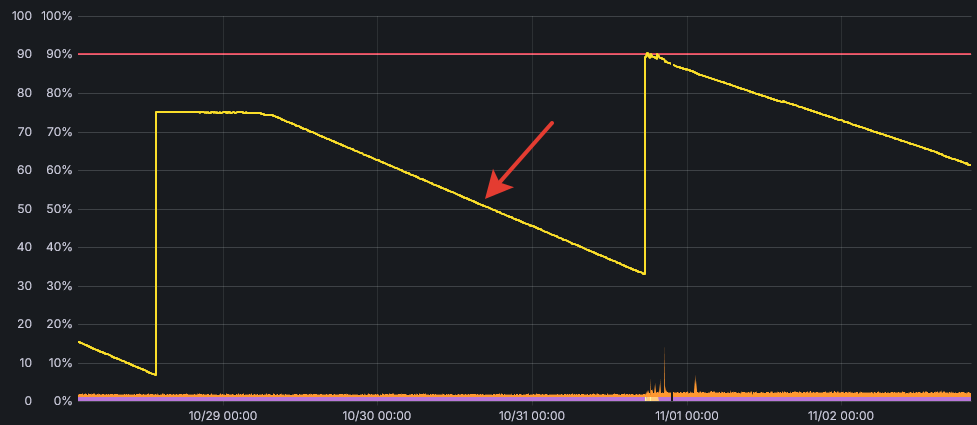
After the upgrade, we detected a memory leak in Vyos Virtual Machines launched on this servers under Hyper-V (apparently in the kernel).
The leak is independent of the number of network adapters, network traffic and configuration (the leak persists when running from the installation ISO without any configuration).
Approximately 2-2.5 GB leaks per day.
The behavior is the same in version 1.3.8 and version 1.4.3.

Top utility does not show any process with high memory usage.
Details

Version
1.4.3
Is it a breaking change?
Unspecified (possibly destroys the router)
Issue type
Bug (incorrect behavior)

Event Timeline

Viacheslav subscribed.

@lbv2rus Do you passthrough NICs to the VM?

No passthrough.
In general, the configuration looks like this:
HP DL 360G10 Servers
Windows Server 2019 with Hyper-V role
Vyos VMs Generation 2.
NIC ports are grouped at the OS level to Team (like bond in Linux).
After installing a new NIC (HPE P26253-B21, Broadcom BCM57416), we simply changed the members of this Network Team, nothing more.
Up to this point, everything had been working properly for several years.

Name                   : VM-BUS-Team
Members                : {VM-BUS-1, VM-BUS-2}
TeamNics               : VM-BUS-Team
TeamingMode            : SwitchIndependent
LoadBalancingAlgorithm : HyperVPort
Status                 : Up

Name                       : VM-BUS-Team
InterfaceDescription       : Microsoft Network Adapter Multiplexor Driver
InterfaceIndex             : 13
MacAddress                 : 
MediaType                  : 802.3
PhysicalMediaType          : 802.3
InterfaceOperationalStatus : Up
AdminStatus                : Up
LinkSpeed(Gbps)            : 20
MediaConnectionState       : Connected
ConnectorPresent           : False
DriverInformation          : Driver Date 2006-06-21 Version 10.0.17763.1

Name                       : VM-BUS-1
InterfaceDescription       : Broadcom P210tep NetXtreme-E Dual-port 10GBASE-T Ethernet PCIe Adapter
InterfaceIndex             : 9
MacAddress                 : 
MediaType                  : 802.3
PhysicalMediaType          : 802.3
InterfaceOperationalStatus : Up
AdminStatus                : Up
LinkSpeed(Gbps)            : 10
MediaConnectionState       : Connected
ConnectorPresent           : True
VlanID                     : 0
DriverInformation          : Driver Date 2024-06-11 Version 230.0.162.0 NDIS 6.82

Name                       : VM-BUS-2
InterfaceDescription       : Broadcom P210tep NetXtreme-E Dual-port 10GBASE-T Ethernet PCIe Adapter #2
InterfaceIndex             : 10
MacAddress                 : 
MediaType                  : 802.3
PhysicalMediaType          : 802.3
InterfaceOperationalStatus : Up
AdminStatus                : Up
LinkSpeed(Gbps)            : 10
MediaConnectionState       : Connected
ConnectorPresent           : True
VlanID                     : 0
DriverInformation          : Driver Date 2024-06-11 Version 230.0.162.0 NDIS 6.82

A virtual switch for Hyper-V has been created based on this group adapter (Microsoft Network Adapter Multiplexor Driver).
VMs are connected to this Switch.

Name                                             : LAN
Notes                                            :
Extensions                                       : {Microsoft Windows Filtering Platform, Microsoft NDIS Capture}
BandwidthReservationMode                         : Absolute
PacketDirectEnabled                              : False
EmbeddedTeamingEnabled                           : False
IovEnabled                                       : False
SwitchType                                       : External
AllowManagementOS                                : True
NetAdapterInterfaceDescription                   : Microsoft Network Adapter Multiplexor Driver
NetAdapterInterfaceDescriptions                  : {Microsoft Network Adapter Multiplexor Driver}
IovSupport                                       : False
IovSupportReasons                                : {This network adapter does not support SR-IOV.}
AvailableIPSecSA                                 : 0
NumberIPSecSAAllocated                           : 0
AvailableVMQueues                                : 112
NumberVmqAllocated                               : 11
IovQueuePairCount                                : 0
IovQueuePairsInUse                               : 0
IovVirtualFunctionCount                          : 0
IovVirtualFunctionsInUse                         : 0
PacketDirectInUse                                : False
DefaultQueueVrssEnabledRequested                 : True
DefaultQueueVrssEnabled                          : True
DefaultQueueVmmqEnabledRequested                 : True
DefaultQueueVmmqEnabled                          : False
DefaultQueueVrssMaxQueuePairsRequested           : 16
DefaultQueueVrssMaxQueuePairs                    : 16
DefaultQueueVrssMinQueuePairsRequested           : 1
DefaultQueueVrssMinQueuePairs                    : 1
DefaultQueueVrssQueueSchedulingModeRequested     : StaticVrss
DefaultQueueVrssQueueSchedulingMode              : StaticVrss
DefaultQueueVrssExcludePrimaryProcessorRequested : False
DefaultQueueVrssExcludePrimaryProcessor          : False
SoftwareRscEnabled                               : True
BandwidthPercentage                              : 10
DefaultFlowMinimumBandwidthAbsolute              : 1000000000
DefaultFlowMinimumBandwidthWeight                : 0
IsDeleted                                        : False
DefaultQueueVmmqQueuePairs                       : 16
DefaultQueueVmmqQueuePairsRequested              : 1

And immediately after changing the network adapter, a memory leak started.

2025-11-04_01-31-20.png (425×977 px, 19 KB)

There is no problem on other Linux (Debian) VMs.

I suspect that the problem is somewhere at the Hyper-V bus driver level, but I don't know how to safely debug the kernel memory in Vyos.

P.S. I tried testing vyos-1.5-stream-2025-Q2, the situation is the same there.