Page MenuHomeVyOS Platform

DHCP server ping check option does not work
Closed, ResolvedPublic

Description

ping-check option not work

probably due parameter value enable-ping-check not change on true
but options

set service dhcp-server shared-network-name LAN ping-check

was setup

vyos@vyos:~$ cat /var/run/kea/kea-dhcp4.conf
{
    "Dhcp4": {
        "interfaces-config": {
            "interfaces": ["eth1"],
            "dhcp-socket-type": "raw",
            "service-sockets-max-retries": 60,
            "service-sockets-retry-wait-time": 5000
        },
        "control-socket": {
            "socket-type": "unix",
            "socket-name": "/var/run/kea/dhcp4-ctrl-socket"
        },
        "lease-database": {
            "type": "memfile",
            "persist": true,
            "name": "/config/dhcp/dhcp4-leases.csv"
        },
        "option-def": [
            {
                "name": "wpad-url",
                "code": 252,
                "type": "string"
            },
            {
                "name": "unifi-controller",
                "code": 1,
                "type": "ipv4-address",
                "space": "ubnt"
            }
        ],
        "hooks-libraries": [
            {
                "library": "/usr/lib/x86_64-linux-gnu/kea/hooks/libdhcp_ping_check.so",
                "parameters": {
                    "enable-ping-check" : false,
                    "min-ping-requests" : 1,
                    "reply-timeout" : 100,
                    "ping-cltt-secs" : 60,
                    "ping-channel-threads" : 0
                }

config:

set service dhcp-server listen-interface 'eth1'
set service dhcp-server shared-network-name LAN authoritative
set service dhcp-server shared-network-name LAN ping-check
set service dhcp-server shared-network-name LAN subnet 185.90.123.0/24 lease '1800'
set service dhcp-server shared-network-name LAN subnet 185.90.123.0/24 option default-router '185.90.123.1'
set service dhcp-server shared-network-name LAN subnet 185.90.123.0/24 option name-server '8.8.8.8'
set service dhcp-server shared-network-name LAN subnet 185.90.123.0/24 option name-server '1.1.1.1'
set service dhcp-server shared-network-name LAN subnet 185.90.123.0/24 range 0 start '185.90.123.100'
set service dhcp-server shared-network-name LAN subnet 185.90.123.0/24 range 0 stop '185.90.123.200'
set service dhcp-server shared-network-name LAN subnet 185.90.123.0/24 subnet-id '10'

versions :

vyos@vyos:~$ kea-dhcp4 -v
3.0.1
vyos@vyos:~$ sh version
Version:          VyOS 1.5-stream-202510071059
Release train:    circinus
Release flavor:   generic

Details

Version
VyOS 1.5-stream-202510071059
Is it a breaking change?
Perfectly compatible
Issue type
Bug (incorrect behavior)

Event Timeline

a.pidnebesny renamed this task from 1.5 Stream Q3 DHCP server issue to 1.5 Stream Q3 DHCP server issue (restard+ping-check).
a.pidnebesny renamed this task from 1.5 Stream Q3 DHCP server issue (restard+ping-check) to 1.5 Stream Q3 DHCP server issue (restart+ping-check).
a.pidnebesny triaged this task as Normal priority.
a.pidnebesny created this object in space S1 VyOS Public.

Can you create a new issue for the restart issue? It seems that problem is due to src/op_mode/restart.py calling commit_in_progress from non-root and not related to any specific changes in Kea commits.

I'll use this task to fix ping-check.

a.pidnebesny renamed this task from 1.5 Stream Q3 DHCP server issue (restart+ping-check) to 1.5 Stream Q3 DHCP server issue (ping-check).Oct 8 2025, 8:24 AM
a.pidnebesny updated the task description. (Show Details)

ping-check behaviour seems correct?

The global scope is disabled, but enabled for specific shared-network:

"shared-networks": [
    {
        "name": "LAN",
        ...
        "user-context": {
            "enable-ping-check": true
        }
]
sarthurdev changed the task status from Open to Needs reporter action.Oct 8 2025, 8:28 AM
sarthurdev reassigned this task from sarthurdev to a.pidnebesny.
sarthurdev subscribed.

I have tested in different ways, and currently stayed with the case where I have a very small DHCP pool and receive error from kea.

Oct 20 07:59:36 vyos kea-dhcp4[15116]: 2025-10-20 07:59:36.851 INFO  [kea-dhcp4.dhcp4/15116.139660359124672] DHCP4_QUERY_LABEL received query: [hwtype=1 00:50:79:66:68:01], cid=[01:00:50:79:66:68:01], tid=0xecf65c6d
Oct 20 07:59:36 vyos kea-dhcp4[15116]: 2025-10-20 07:59:36.852 INFO  [kea-dhcp4.packets/15116.139660359124672] DHCP4_PACKET_RECEIVED [hwtype=1 00:50:79:66:68:01], cid=[01:00:50:79:66:68:01], tid=0xecf65c6d: DHCPDISCOVER (type 1) received from 0.0.0.0 to 255.255.255.255 on interface eth1
Oct 20 07:59:36 vyos kea-dhcp4[15116]: 2025-10-20 07:59:36.854 INFO  [kea-dhcp4.leases/15116.139660359124672] DHCP4_LEASE_OFFER [hwtype=1 00:50:79:66:68:01], cid=[01:00:50:79:66:68:01], tid=0xecf65c6d: lease 185.90.123.103 will be offered
Oct 20 07:59:36 vyos kea-dhcp4[15116]: 2025-10-20 07:59:36.854 INFO  [kea-dhcp4.leases/15116.139660359124672] DHCP4_LEASE_REUSE [hwtype=1 00:50:79:66:68:01], cid=[01:00:50:79:66:68:01], tid=0xecf65c6d: lease 185.90.123.103 has been reused for 1393 seconds
Oct 20 07:59:36 vyos kea-dhcp4[15116]: 2025-10-20 07:59:36.854 ERROR [kea-dhcp4.ping-check-hooks/15116.139660359124672] PING_CHECK_LEASE4_OFFER_FAILED lease4_offer callout failed for query [hwtype=1 00:50:79:66:68:01], cid=[01:00:50:79:66:68:01], tid=0xecf65c6d, lease address <no lease>, reason leases4 is empty, no lease to check
Oct 20 07:59:36 vyos kea-dhcp4[15116]: 2025-10-20 07:59:36.854 ERROR [kea-dhcp4.callouts/15116.139660359124672] HOOKS_CALLOUT_ERROR error returned by callout on hook lease4_offer registered by library with index 1 (callout address 0x7f0536a3d760) (callout duration 0.128 ms)
Oct 20 07:59:36 vyos kea-dhcp4[15116]: 2025-10-20 07:59:36.854 INFO  [kea-dhcp4.packets/15116.139660359124672] DHCP4_PACKET_SEND [hwtype=1 00:50:79:66:68:01], cid=[01:00:50:79:66:68:01], tid=0xecf65c6d: trying to send packet DHCPOFFER (type 2) from 185.90.123.1:67 to 185.90.123.103:68 on interface eth1
Oct 20 07:59:37 vyos kea-dhcp4[15116]: 2025-10-20 07:59:37.857 INFO  [kea-dhcp4.dhcp4/15116.139660359124672] DHCP4_QUERY_LABEL received query: [hwtype=1 00:50:79:66:68:01], cid=[01:00:50:79:66:68:01], tid=0xecf65c6d
Oct 20 07:59:37 vyos kea-dhcp4[15116]: 2025-10-20 07:59:37.857 INFO  [kea-dhcp4.packets/15116.139660359124672] DHCP4_PACKET_RECEIVED [hwtype=1 00:50:79:66:68:01], cid=[01:00:50:79:66:68:01], tid=0xecf65c6d: DHCPREQUEST (type 3) received from 0.0.0.0 to 255.255.255.255 on interface eth1
Oct 20 07:59:37 vyos kea-dhcp4[15116]: 2025-10-20 07:59:37.857 INFO  [kea-dhcp4.leases/15116.139660359124672] DHCP4_LEASE_ALLOC [hwtype=1 00:50:79:66:68:01], cid=[01:00:50:79:66:68:01], tid=0xecf65c6d: lease 185.90.123.103 has been allocated for 1800 seconds
Oct 20 07:59:37 vyos kea-dhcp4[15116]: 2025-10-20 07:59:37.857 INFO  [kea-dhcp4.leases/15116.139660359124672] DHCP4_LEASE_REUSE [hwtype=1 00:50:79:66:68:01], cid=[01:00:50:79:66:68:01], tid=0xecf65c6d: lease 185.90.123.103 has been reused for 1392 seconds

before (with big pool) that was just single error per 100x dhcp offers request.
But im still not catch ICMP when the dhcp prepare offer for client
dumps when i run DHCP request from client

vyos@vyos:~$ monitor traffic interface any
tcpdump: data link type LINUX_SLL2
tcpdump: verbose output suppressed, use -v[v]... for full protocol decode
listening on any, link-type LINUX_SLL2 (Linux cooked v2), snapshot length 262144 bytes
08:18:34.561369 eth1  B   IP 0.0.0.0.bootpc > 255.255.255.255.bootps: BOOTP/DHCP, Request from 00:50:79:66:68:00 (oui Unknown), length 364
08:18:34.565880 eth1  Out IP 185.90.123.1.bootps > 185.90.123.100.bootpc: BOOTP/DHCP, Reply, length 292
08:18:34.609878 lo    In  IP localhost.41474 > localhost.domain: 1719+ PTR? 255.255.255.255.in-addr.arpa. (46)
08:18:34.609977 lo    In  IP localhost > localhost: ICMP localhost udp port domain unreachable, length 82
08:18:34.610101 lo    In  IP localhost.42387 > localhost.domain: 1719+ PTR? 255.255.255.255.in-addr.arpa. (46)
08:18:34.610121 lo    In  IP localhost > localhost: ICMP localhost udp port domain unreachable, length 82
08:18:34.610485 lo    In  IP localhost.55419 > localhost.domain: 49482+ PTR? 0.0.0.0.in-addr.arpa. (38)
08:18:34.610508 lo    In  IP localhost > localhost: ICMP localhost udp port domain unreachable, length 74
08:18:34.610577 lo    In  IP localhost.38216 > localhost.domain: 49482+ PTR? 0.0.0.0.in-addr.arpa. (38)
08:18:34.610593 lo    In  IP localhost > localhost: ICMP localhost udp port domain unreachable, length 74
08:18:34.611165 lo    In  IP localhost.38152 > localhost.domain: 2125+ PTR? 100.123.90.185.in-addr.arpa. (45)
08:18:34.611188 lo    In  IP localhost > localhost: ICMP localhost udp port domain unreachable, length 81
08:18:34.623966 lo    In  IP localhost.48653 > localhost.domain: 2125+ PTR? 100.123.90.185.in-addr.arpa. (45)
08:18:34.623996 lo    In  IP localhost > localhost: ICMP localhost udp port domain unreachable, length 81
08:18:34.624270 lo    In  IP localhost.46447 > localhost.domain: 44708+ PTR? 1.123.90.185.in-addr.arpa. (43)
08:18:34.624294 lo    In  IP localhost > localhost: ICMP localhost udp port domain unreachable, length 79
08:18:34.624398 lo    In  IP localhost.55525 > localhost.domain: 44708+ PTR? 1.123.90.185.in-addr.arpa. (43)
08:18:34.624416 lo    In  IP localhost > localhost: ICMP localhost udp port domain unreachable, length 79
08:18:35.578726 eth1  In  IP 0.0.0.0.bootpc > 255.255.255.255.bootps: BOOTP/DHCP, Request from 00:50:79:66:68:00 (oui Unknown), length 364
08:18:35.580345 eth1  Out IP 185.90.123.1.bootps > 185.90.123.100.bootpc: BOOTP/DHCP, Reply, length 292
08:18:36.587981 eth1  B   ARP, Request who-has 185.90.123.100 (Broadcast) tell 185.90.123.100, length 50
08:18:37.597262 eth1  B   ARP, Request who-has 185.90.123.100 (Broadcast) tell 185.90.123.100, length 50
08:18:38.608105 eth1  B   ARP, Request who-has 185.90.123.100 (Broadcast) tell 185.90.123.100, length 50

image.png (152×934 px, 20 KB)

config:

set service dhcp-server listen-interface 'eth1'
set service dhcp-server shared-network-name LAN authoritative
set service dhcp-server shared-network-name LAN ping-check
set service dhcp-server shared-network-name LAN subnet 185.90.123.0/24 lease '1800'
set service dhcp-server shared-network-name LAN subnet 185.90.123.0/24 option default-router '185.90.123.1'
set service dhcp-server shared-network-name LAN subnet 185.90.123.0/24 option name-server '8.8.8.8'
set service dhcp-server shared-network-name LAN subnet 185.90.123.0/24 option name-server '1.1.1.1'
set service dhcp-server shared-network-name LAN subnet 185.90.123.0/24 ping-check
set service dhcp-server shared-network-name LAN subnet 185.90.123.0/24 range 0 start '185.90.123.100'
set service dhcp-server shared-network-name LAN subnet 185.90.123.0/24 range 0 stop '185.90.123.103'
set service dhcp-server shared-network-name LAN subnet 185.90.123.0/24 subnet-id '10'
a.pidnebesny changed the task status from Needs reporter action to Open.Oct 23 2025, 7:38 AM

@sarthurdev please take attention.
Thanks.

sarthurdev changed the task status from Open to Confirmed.Tue, Nov 18, 11:26 AM
sarthurdev claimed this task.

Thanks Andrii, confirmed the issue.

sarthurdev changed the task status from Confirmed to In progress.Thu, Nov 20, 1:26 PM

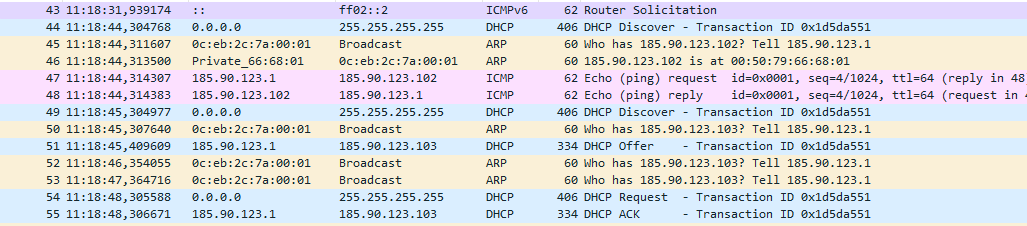
Tested, both option

set service dhcp-server shared-network-name LAN subnet 185.90.123.0/24 ping-check
set service dhcp-server shared-network-name LAN ping-check

on dump i see ICMP, and correct DHCP offer.

image.png (226×1 px, 33 KB)

Works fine, on my opinion

dmbaturin renamed this task from 1.5 Stream Q3 DHCP server issue (ping-check) to DHCP server ping check option does not work.Thu, Dec 4, 8:53 PM
dmbaturin closed this task as Resolved.
dmbaturin changed Is it a breaking change? from Unspecified (possibly destroys the router) to Perfectly compatible.