VPN IPsec unexpected passthrough logic bug was introduced in this commit
The correct behaviour of the cidr_fit was replaced with the incorrect overlap.
Example:
>>> from ipaddress import ip_network
>>>
>>> a = ip_network('192.0.2.0/24')
>>> b = ip_network('192.0.2.100/30')
>>>
>>> a.overlaps(b)
True
>>>
>>> b.overlaps(a)
True
>>>
But there should be subnet_of
>>> a.subnet_of(b)
False
>>>
>>> b.subnet_of(a)
True
>>>
This way, the passthrough option is used every time when networks overlap.
There is a network diagram
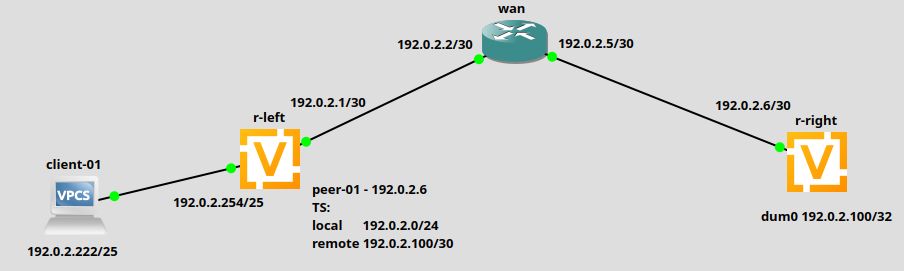
The router r-left configuration:
set interfaces ethernet eth0 address '192.0.2.1/30'
set interfaces ethernet eth1 address '192.0.2.254/25'
set system host-name 'r-left'
set vpn ipsec authentication psk PSK id '192.0.2.1'
set vpn ipsec authentication psk PSK id '192.0.2.6'
set vpn ipsec authentication psk PSK secret '1234567890'
set vpn ipsec esp-group ESP-group lifetime '3600'
set vpn ipsec esp-group ESP-group mode 'tunnel'
set vpn ipsec esp-group ESP-group pfs 'enable'
set vpn ipsec esp-group ESP-group proposal 1 encryption 'aes256'
set vpn ipsec esp-group ESP-group proposal 1 hash 'sha1'
set vpn ipsec ike-group IKE-group key-exchange 'ikev2'
set vpn ipsec ike-group IKE-group lifetime '28800'
set vpn ipsec ike-group IKE-group proposal 1 encryption 'aes256'
set vpn ipsec ike-group IKE-group proposal 1 hash 'sha1'
set vpn ipsec interface 'eth0'
set vpn ipsec site-to-site peer RIGHT authentication local-id '192.0.2.1'
set vpn ipsec site-to-site peer RIGHT authentication mode 'pre-shared-secret'
set vpn ipsec site-to-site peer RIGHT authentication remote-id '192.0.2.6'
set vpn ipsec site-to-site peer RIGHT connection-type 'initiate'
set vpn ipsec site-to-site peer RIGHT ike-group 'IKE-group'
set vpn ipsec site-to-site peer RIGHT local-address '192.0.2.1'
set vpn ipsec site-to-site peer RIGHT remote-address '192.0.2.6'
set vpn ipsec site-to-site peer RIGHT tunnel 0 esp-group 'ESP-group'
set vpn ipsec site-to-site peer RIGHT tunnel 0 local prefix '192.0.2.0/24'
set vpn ipsec site-to-site peer RIGHT tunnel 0 remote prefix '192.0.2.100/30'
The router r-right configuration:
set interfaces dummy dum0 address '192.0.2.100/32'
set interfaces ethernet eth0 address '192.0.2.6/30'
set interfaces loopback lo
set protocols static route 192.0.2.1/32 next-hop 192.0.2.5
set vpn ipsec authentication psk PSK id '192.0.2.1'
set vpn ipsec authentication psk PSK id '192.0.2.6'
set vpn ipsec authentication psk PSK secret '1234567890'
set vpn ipsec esp-group ESP-group lifetime '3600'
set vpn ipsec esp-group ESP-group mode 'tunnel'
set vpn ipsec esp-group ESP-group pfs 'enable'
set vpn ipsec esp-group ESP-group proposal 1 encryption 'aes256'
set vpn ipsec esp-group ESP-group proposal 1 hash 'sha1'
set vpn ipsec ike-group IKE-group key-exchange 'ikev2'
set vpn ipsec ike-group IKE-group lifetime '28800'
set vpn ipsec ike-group IKE-group proposal 1 encryption 'aes256'
set vpn ipsec ike-group IKE-group proposal 1 hash 'sha1'
set vpn ipsec interface 'eth0'
set vpn ipsec site-to-site peer LEFT authentication local-id '192.0.2.6'
set vpn ipsec site-to-site peer LEFT authentication mode 'pre-shared-secret'
set vpn ipsec site-to-site peer LEFT authentication remote-id '192.0.2.1'
set vpn ipsec site-to-site peer LEFT connection-type 'respond'
set vpn ipsec site-to-site peer LEFT ike-group 'IKE-group'
set vpn ipsec site-to-site peer LEFT local-address '192.0.2.6'
set vpn ipsec site-to-site peer LEFT remote-address '192.0.2.1'
set vpn ipsec site-to-site peer LEFT tunnel 0 esp-group 'ESP-group'
set vpn ipsec site-to-site peer LEFT tunnel 0 local prefix '192.0.2.100/30'
set vpn ipsec site-to-site peer LEFT tunnel 0 remote prefix '192.0.2.0/24'
Check the strongswan configuration on the router r-left and get unexpected passthrough with traffic selectors local/remote 192.0.2.0/24
vyos@r-left# cat /etc/swanctl/swanctl.conf | grep passthrough -A5
            RIGHT-tunnel-0-passthrough {
                local_ts = 192.0.2.0/24
                remote_ts = 192.0.2.0/24
                start_action = trap
                mode = pass
            }
This way, traffic generated from the client-01 does not send via SA's IPsec out but passes through to the main routing table (without IPsec).
vyos@client-01:~$ ping 192.0.2.100 count 2
PING 192.0.2.100 (192.0.2.100) 56(84) bytes of data.

--- 192.0.2.100 ping statistics ---
2 packets transmitted, 0 received, 100% packet loss, time 1019ms

vyos@client-01:~$
We can see it here (no out packets):
vyos@r-left# sudo swanctl -l
RIGHT: #1, ESTABLISHED, IKEv2, 8f04aedee88d168b_i* e06c6f6c279b72f8_r
  local  '192.0.2.1' @ 192.0.2.1[4500]
  remote '192.0.2.6' @ 192.0.2.6[4500]
  AES_CBC-256/HMAC_SHA1_96/PRF_HMAC_SHA1/MODP_1024
  established 1970s ago, rekeying in 24320s
  RIGHT-tunnel-0: #1, reqid 1, INSTALLED, TUNNEL, ESP:AES_CBC-256/HMAC_SHA1_96
    installed 1970s ago, rekeying in 1045s, expires in 1631s
    in  cfe45694, 115500 bytes,  1375 packets,   284s ago
    out c2c9c529,      0 bytes,     0 packets
    local  192.0.2.0/24
    remote 192.0.2.100/30
[edit]
vyos@r-left#
To fix it use subnet_of instead of overlap here https://github.com/vyos/vyos-1x/blob/1268ebb05e909027ecf1b9b4af4a6282d944efa7/src/conf_mode/vpn_ipsec.py#L726-L733