Page MenuHomeVyOS Platform

Supermicro IPMI/BMC keyboard/mouse not working after boot
Open, NormalPublicBUG

Description

Hi,

Encountered a strange problem today. When installing VyOS bare-metal on a set of servers, the keyboard/mouse input via BMC/IPMI stops working after booting the installed VyOS version.

Tested on the following systems:

  • Supermicro SYS-5019C-M4L (running latest BMC/BIOS versions)
  • Supermicro SYS-5019S-ML (running latest BMC/BIOS versions)

Observations:

  • Keyboard works in BIOS + boot select + GRUB/boot.
  • After live boot, keyboard also works (can go through "install image" process).
  • Once booting from disk, keyboard stops working after booting into VyOS
  • If we keep typing random characters during boot (after GRUB, before login), the keyboard works during login, but if we leave it idle, it stops working again.
  • Happens with 1.4.2 + 1.4.3 + 1.5-stream-2025-Q2 + latest rolling (2025.10.07-0019-rolling)
  • Works with other OS (tested with latest OPNsense 25.7)
  • Using separate keyboard/mouse works (via IP-KVM or directly connected)
  • Seems to only happen to VyOS, and only after booting installed version
Details

Version
1.4.2, 1.4.3, 1.5-stream-2025-Q2, 2025.10.07-0019-rolling
Is it a breaking change?
Behavior change
Issue type
Bug (incorrect behavior)

Event Timeline

jocke renamed this task from Supermicro X11 IPMI/BMC keyboard/mouse not working after boot to Supermicro IPMI/BMC keyboard/mouse not working after boot.

Tried Debian too (debian-live-13.1.0-amd64-standard.iso). Live-boot 13.1.0 works. Boot from disk/installed Debian 13.1.0 also works.

Not sure what more information would be needed?

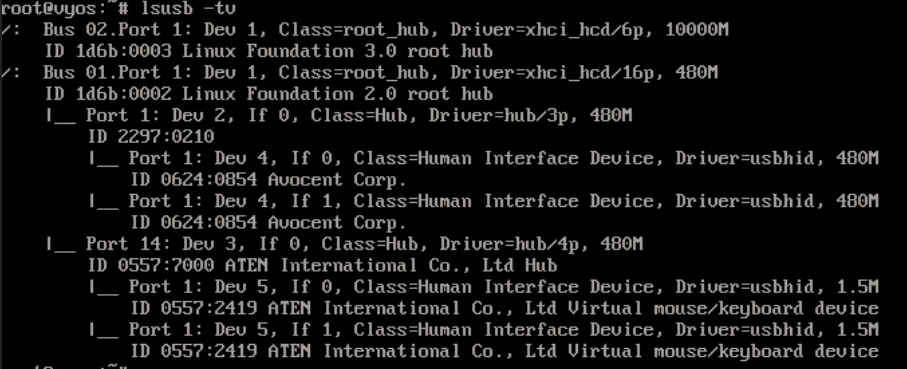
lsusb @ VyOS 1.4.3:

Screen-Capture-2025-10-08-21-58-20.png (369×907 px, 304 KB)

lsusb @ installed Debian 13.1.0:

Screen-Capture-2025-10-08-21-57-24.png (274×711 px, 93 KB)

The Avocent-entries are for the IP-KVM also connected to the servers (external dongles). Removing/disconnecting them does not fix the issue (i.e. they are not interfering in any way).

The ATEN-entries is the Supermicro BMC/IPMI.

We found this Debian bug report, which seems to be somewhat similar: https://bugs.debian.org/cgi-bin/bugreport.cgi?bug=1116074

However, everything seems to be working for us in Debian 13.1.0. They also report that keyboard stops working during GRUB selection, which seems to work in our scenario (when it comes to VyOS). It's post-GRUB-selection that stops working for us.

This is still a problem. We have found no suitable fixes, and I think we've tried "everything" without avail.

For now we have a "workaround" by using the SOL feature (Serial over LAN). This makes us able to access everything pre-boot via IPMI, and everything post-boot via SSH to IPMI (SOL).

Hi

I stumbled across the same issue and as far as i could debug it, its due to usb/hid devices being outosuspended by the current vyos kernel/config.

quick fix / workaround disable autosuspend

set system option disable-usb-autosuspend

I can confirm "set system option disable-usb-autosuspend" fixes the issue on Supermicro X11SCM-F with current BIOS 2.9 / BMC 1.74.21.
The virtual keyboard can be made to work for a while by clicking Options -> Keyboard Mouse Hotplug in the iKVM window.
Then quickly log in and type this (the keyboard freezes again after a few seconds of inactivity):

configure
set system option disable-usb-autosuspend
commit
save
exit
reboot
Y

Are there any downsides to disable autosuspend by default? It seems to be disabled (keyboard works fine) in the live installer, but enabled in the installed system.

No such issue on slightly older X11SSL-F board (current BIOS 3.6 / BMC 1.82), with older BMC (AST2400, vs AST2500 in X11SCM-F).